Financial Technology
AI for Startups: Balancing Budgets and Growth
Cost-management and forecasting tactics for startups using AI: budget splits, pilot projects, model routing, and expense controls.

AI for Startups: Balancing Budgets and Growth
Startups are caught in a tough spot: AI is critical for growth, but it’s expensive. By 2026, many startups spend 15–25% of their revenue on AI infrastructure compared to 5–10% for traditional SaaS companies. Costs like GPU hardware, API usage, and maintenance can spiral quickly, making it hard to balance innovation with financial sustainability.
To manage these challenges:
- Budget wisely: Divide costs into fixed (subscriptions, setup fees) and variable (API usage, scaling expenses).
- Optimize usage: Use cost-efficient AI models for routine tasks and premium ones only when necessary.
- Start small: Pilot AI tools on high-impact areas before scaling up.
- Track costs: Regularly audit tools to eliminate waste and improve efficiency.
With proper planning, startups can leverage AI without draining resources. Tools like AI-powered forecasting can even improve cash flow predictions and expense tracking, helping founders make smarter financial decisions.
AI Costs Spiraling Out of Control? Here's Your Battle Plan
sbb-itb-212c9ea
How to Budget for AI Tools
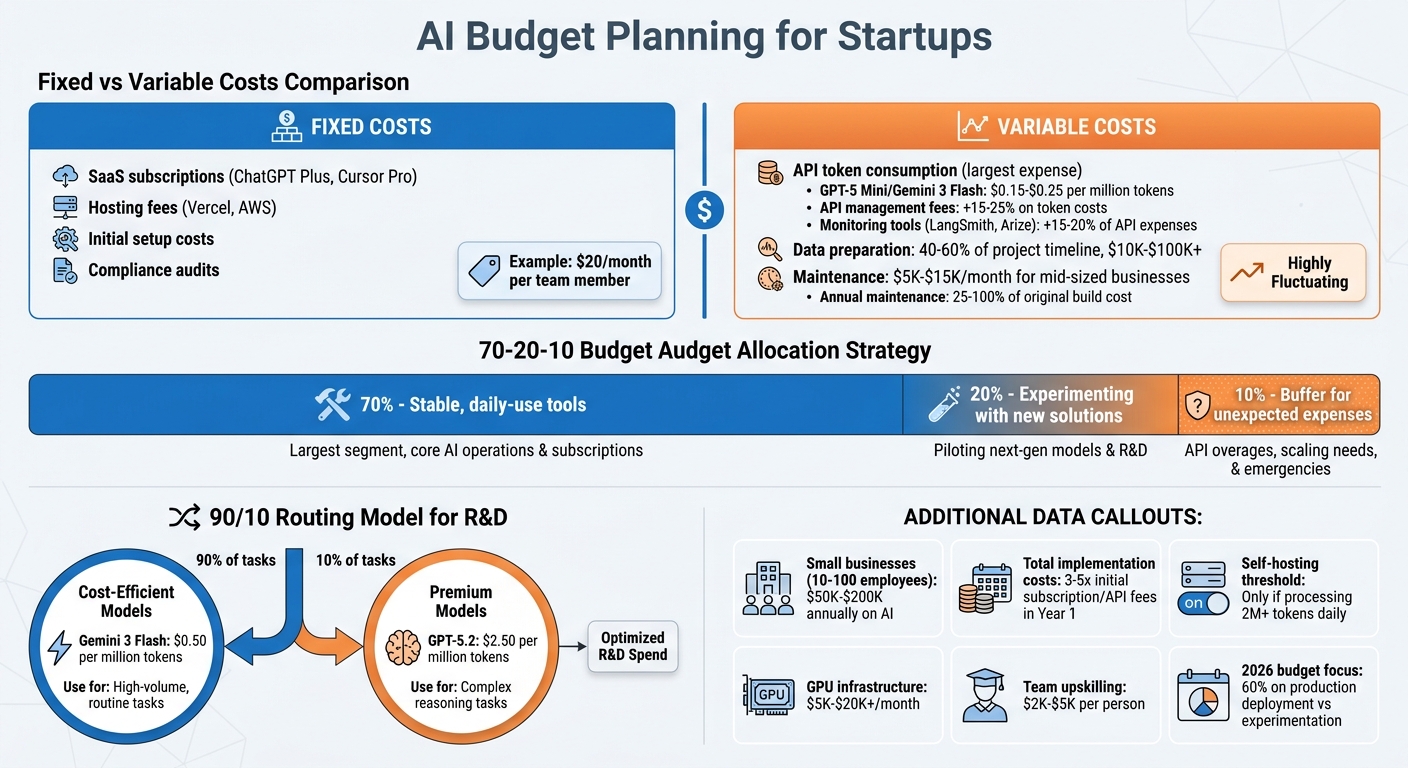
AI Budget Breakdown for Startups: Fixed vs Variable Costs and 70-20-10 Allocation Strategy
When planning your AI budget, it’s essential to think beyond just subscription fees or API charges. Many startups fall into the trap of underestimating costs, but the reality is that implementing AI can end up costing 3–5 times more than the initial subscription or API fees during the first year. Why? Expenses like integration, data preparation, and ongoing maintenance add up quickly. For example, small businesses with 10–100 employees often spend between $50,000 and $200,000 annually on AI initiatives. To avoid surprises, break your budget into fixed and variable costs. This approach gives you a clearer picture of where your money is going.
Understanding Fixed and Variable Costs
Fixed costs are the predictable expenses that remain consistent month to month, regardless of how much you use the tools. Examples include SaaS subscriptions like ChatGPT Plus or Cursor Pro, hosting fees from platforms like Vercel or AWS, initial setup costs, and compliance audits. For instance, if you’re paying $20 per month for each team member to access an AI writing tool, that’s a fixed cost you can easily account for in your budget.
Variable costs, on the other hand, depend on your usage. The largest variable expense for most businesses is API token consumption, which grows as your user base expands or your features become more complex. For example, a startup handling customer support might spend $0.15–$0.25 per million tokens using models like GPT-5 Mini or Gemini 3 Flash. Don’t forget to factor in additional API management fees, which can add 15–25% to your token costs. Tools for monitoring, like LangSmith or Arize, can also tack on another 15–20% of your API expenses.
Data preparation is another major cost. Cleaning and formatting your data often eats up 40–60% of an AI project’s timeline and can cost anywhere from $10,000 to over $100,000. Beyond that, maintenance is a constant expense. AI systems need regular updates, prompt tuning, and bug fixes. For mid-sized businesses, maintenance engineering alone can cost $5,000 to $15,000 per month, and annual maintenance costs often range from 25% to 100% of the original build cost.
Once you’ve categorized your costs, you can make smarter decisions about where to allocate your resources.
Where to Invest: R&D, Infrastructure, and Team
A good rule of thumb is to divide your budget with a 70-20-10 strategy: 70% for stable, daily-use tools, 20% for experimenting with new solutions, and 10% as a buffer for unexpected expenses like API overages or scaling needs.
For R&D, consider using a 90/10 routing model. Send 90% of high-volume, routine tasks to cost-efficient models like Gemini 3 Flash, which costs $0.50 per million tokens, and reserve premium models like GPT-5.2, which costs $2.50 per million tokens, for the 10% of tasks that require more complex reasoning.
Managed APIs are a smart choice for businesses with lower token usage. Only switch to self-hosting if you’re processing more than 2 million tokens daily. Why? Self-hosting requires GPU infrastructure, which can cost anywhere from $5,000 to $20,000+ per month.
Finally, invest in upskilling your existing team rather than hiring new specialists. Training employees typically costs $2,000–$5,000 per person, giving you better ROI compared to expanding your workforce. It’s worth noting that in 2026, the majority of AI budgets (60%) were focused on production deployment and operations, a shift from 2023 when most funds were directed toward experimentation. This shift underscores the importance of planning for long-term operational costs.
Using AI Tools to Forecast and Manage Budgets
Once you've categorized your costs, the next step is predicting your actual cash flow. Traditional spreadsheet-based forecasting often falls short, with a median error rate of 25–40% for quarterly revenue projections. In contrast, AI-powered forecasting tools can reduce that error to 10–15%, saving small business finance teams 15–20 hours of financial planning each month. The key advantage lies in AI's ability to recognize patterns that might escape human analysis - like how a specific marketing channel drives revenue weeks later or how customer churn aligns with support ticket trends.
With your budget categories in place, AI tools can help you shift to more precise forecasting, making it easier to handle cash flow challenges effectively.
Predicting Revenue and Expenses Automatically
AI models, trained on your accounts receivable data, can predict when invoices will be collected with 85–90% accuracy, compared to the 60–70% accuracy of manual methods. This is crucial because knowing when cash will actually hit your account is far more actionable than simply knowing how much you've billed. These tools continuously learn from incoming data, adjusting future projections automatically - no need to update formulas or rebuild models.
For example, AI can forecast scaling costs - like infrastructure or marketing expenses - with an error margin of just 5–10%, compared to 15–25% with manual processes. This level of accuracy is especially helpful in predicting cost surges, such as when user activity doubles. However, before diving into AI forecasting, ensure you have 12–24 months of well-categorized transaction data. Clean data is essential - label similar expenses consistently (e.g., "Office Supplies" and "Supplies - Office" should be merged) to prevent the AI from misinterpreting them as separate categories.
Planning for Different Business Scenarios
AI doesn't just predict revenue and expenses - it also helps you plan for different business scenarios. These tools can model over 500 scenarios in seconds, offering probability distributions that outline a range of possible outcomes. For example, they can show how a delayed payment from a major client or a 15% increase in raw material costs might impact your finances. This approach is particularly valuable for startups weighing decisions like whether to hire two developers at $110,000 each or allocate that budget to marketing.
A good strategy involves creating conservative, moderate, and aggressive projections side by side. This allows you to prepare for various market conditions and set realistic milestones. Start by applying AI to a critical area, such as cash flow if shortfalls are frequent, or revenue if your pipeline forecasts are often inaccurate. Once you've seen results, you can expand AI's role to manage your entire budget. While AI can provide a solid baseline forecast, human judgment remains essential for factoring in strategic shifts or unexpected events that historical data can't predict. With tools costing between $50 and $500 per month, even early-stage startups can access these capabilities. This combination of AI-driven insights and human oversight can help you grow sustainably while keeping tight control over your budget.
How to Choose AI Tools That Fit Your Budget and Scale
What to Look for When Choosing AI Tools
When it comes to selecting AI tools, the subscription fee is just the starting point. You’ll also need to account for additional costs like setup and learning, which can range from $600 to $1,200, and possibly $20–$69 per month for middleware if integrations aren’t built-in. To avoid unnecessary expenses, check whether the tool connects natively to your CRM, calendar, or messaging systems. Without native integration, you might end up paying for duplicate workflows.
Transparency in pricing is another key factor. Be on the lookout for hidden costs like per-message fees, tiered feature access, or setup charges. A smart strategy is to start with free tiers for about 30 days. This trial period can help you identify potential bottlenecks - like email credit limits or API restrictions - before committing to an upgrade. Only move to a paid plan if the return on investment (ROI) is clear. For instance, a $20/month tool should save you at least five hours of work valued at $50/hour to make financial sense.
"If a tool requires a developer to configure, it is not built for small businesses. Period." - Martin Bowling, Founder, Appalach.AI
Consider tools that offer training tailored to your industry rather than generic solutions. While general-purpose tools may work for brainstorming, they often fall short for specialized tasks like lead qualification or technical diagnostics. AI tools trained on data specific to your field can deliver noticeably better results. Additionally, verify that the vendor doesn’t use your proprietary data to improve their broader models. Look for tools with "no-training" defaults or private server options to safeguard your information.
Ease of setup is another important consideration. The best tools should be ready to use after just an afternoon of setup by the business owner, not weeks of work by a developer. Tools requiring custom code or extensive engineering resources might not be practical for small businesses or startups. Also, choose tools with scalable pricing - where costs grow with your usage or revenue - rather than flat enterprise fees that could strain your budget early on.
By following these guidelines, you can select AI tools that support growth without unexpected costs. Once you’ve outlined your criteria, use a centralized platform to compare options efficiently.
Finding AI Tools on AI Apps
To simplify your search for the right AI tools, AIapps.com offers a comprehensive directory tailored to startups. With over 14,000 AI tools listed (double the number since 2025), finding the perfect fit can feel overwhelming. However, AIapps.com makes it easier by curating a selection of 1,900+ verified tools across categories like writing, design, business, and productivity. Advanced search and filtering options allow you to compare tools side by side, focusing on key factors like integration support, pricing models, and industry-specific capabilities.
The platform also highlights tools suited to your startup’s growth stage, with featured listings offering greater visibility. Free listings include basic details, while premium placements provide more in-depth information. This centralized hub eliminates the need to jump between multiple vendor websites, saving time and effort.
| Evaluation Criterion | What to Check | Why It Matters |
|---|---|---|
| Industry-Specific Training | Does the tool handle your field's unique tasks? | Generic tools provide generic results; specialized tools deliver better outcomes. |
| Integration Compatibility | Native integration versus reliance on middleware | Middleware can add $20–$69/month and increase manual work. |
| Pricing Transparency | Hidden fees, per-message costs, or tiered gating? | Actual costs can be 3–5x higher than advertised. |
| Ease of Setup | Can it be set up in an afternoon? | Complex tools delay value and require developer support. |
| Data Privacy | Is your data used to train their models? | Protects your proprietary information and builds client trust. |
AIapps.com also allows you to audit your AI subscriptions quarterly, helping you consolidate your tools and cut costs by 15–30% when switching to annual billing. By managing your AI stack through this platform, startups can reduce expenses while ensuring scalability.
Steps to Implement AI While Controlling Costs
Implementation Guide for Startups
Adopting AI doesn't mean diving in headfirst - it works best when approached with a phased investment strategy. Start small by dedicating 10–15% of your budget to a 3–4 month pilot program focused on one high-value use case. Once you’ve demonstrated ROI, scale up by allocating 40–50% of your budget to full deployment, leaving the remainder for fine-tuning and optimization. This method ensures you don’t overspend before figuring out what delivers the best results for your business.
Kick things off by setting baseline metrics like task completion times, output quality, and current costs. Then, clean your data - this means polishing up your CSVs and standardizing your CRM. Since data preparation can eat up 40–60% of your project’s timeline, tackling it early is essential. Afterward, test the waters with a proof of concept using API-based tools. Run a limited pilot with a small user group before scaling up. Once you’re ready for full production, integrate autoscaling and governance to keep things running smoothly. Following these steps will help you stay on budget while ensuring your AI systems are scalable.
When rolling out AI, consider applying the 90/10 model split. Use cost-efficient models like Gemini 3 Flash ($0.50 per 1 million input tokens) for 90% of routine, high-volume tasks, and reserve premium models like GPT-5.2 ($1.75 per 1 million tokens) for the remaining 10% of tasks that require advanced reasoning. To prevent overspending, set up a centralized AI gateway to monitor traffic, track usage, and enforce department-specific budget limits.
"Single-model budgets that route everything through GPT-5.2 are financially unviable at production scale." - DigitalApplied
Keep in mind that costs go beyond subscription fees. For example, monitoring tools like LangSmith can add a 15–20% "observability tax" to your total API expenses. Additionally, API rate limits, timeouts, and validation failures can increase overhead by 15–25%. To cut costs, adopt strategies like semantic caching to save up to 90% on repeated API inputs and optimize prompts to reduce token usage by 15–35%. Budgeting per task (e.g., $0.10–$0.50) rather than per query can also help you avoid unexpected cost spikes.
Once you’ve got your technical setup and cost-management strategies in place, the next step is to focus on how you position your AI tool for visibility in the market.
Free vs. Featured Listings on AI Apps: Cost and Visibility
Beyond the technical setup, how you market your AI tool can make a big difference in cost efficiency and user acquisition. AIapps.com provides two listing options: Free and Featured. Free listings are great for early-stage testing and validation, while featured listings, which cost between $20 and $300+ per month, offer increased visibility through homepage placement, top spots in categories, and a more prominent design - perfect for scaling up.
| Feature | Free Listing | Featured Listing | Budget Impact |
|---|---|---|---|
| Monthly Cost | $0 | $20–$300+ | Predictable marketing expense |
| Visibility | Standard directory placement | Homepage and top category spots | Higher user acquisition rate |
| Brand Control | Basic tool information | Enhanced visual presence | Improved brand recognition |
| Best For | Validation phase, low volume | Growth stage, active user acquisition | Scalable with business needs |
If you’re still in the validation phase, a free listing allows you to gauge demand without spending extra. But once you’ve confirmed your tool meets a real need, upgrading to a featured listing can help you attract more users. This approach works particularly well if the cost per new user is less than the lifetime value of your customers.
Conclusion: Growing Your Startup with Budget-Friendly AI
With 70–80% of AI startups failing due to poor capital efficiency, it’s crucial to start small and focus on measurable outcomes. Begin with a targeted pilot program that tracks cost per outcome by analyzing customer feedback and takes advantage of usage-based pricing. This way, AI becomes a tool for leverage rather than a drain on resources.
Prioritize automating real bottlenecks - those manual, time-consuming processes that slow down your operations - over stacking subscriptions for features you might not even need yet. Conduct quarterly audits to weed out redundant tools, and consider techniques like smart caching and prompt optimization to slash API costs by 30–50%.
"When you deliberately pick AI tools for startups on a budget, you flip that script and treat AI as leverage, not a luxury expense." - Editorial Team, Entrepreneur Loop
Platforms like AIapps.com simplify this process by offering access to over 1,900 AI tools in one place. Whether you’re looking for free tools during your validation phase or ready to scale with premium features, resources like this make it easier to compare options based on unit economics - such as cost per resolved ticket or per published article - instead of just focusing on monthly subscription fees.
FAQs
How do I estimate my first-year AI costs beyond API pricing?
When planning your first-year AI budget, it’s essential to think beyond just API pricing. There are several hidden costs to factor in, such as research and development (R&D), cloud infrastructure, data acquisition, compliance requirements, ongoing monitoring, and team training. These operational expenses can significantly increase your initial API budget, sometimes by 3 to 5 times.
For small-scale operations, typical budgets might range between $200 and $400 per month, which often support revenues of $5,000 to $15,000. By accounting for these additional factors upfront, you can avoid unexpected financial surprises and set the stage for sustainable growth.
When should a startup switch from managed AI APIs to self-hosting?
Startups should consider switching to self-hosting when the total cost of ownership (TCO) becomes more favorable than relying on APIs. This tipping point often occurs when API expenses hit around $20,000 per month or usage reaches 5–10 million tokens. However, it's essential to factor in hidden costs like infrastructure setup, ongoing maintenance, and the engineering hours required to manage the system. These additional expenses can easily outweigh any potential savings, especially at lower usage levels. For smaller-scale operations, managed APIs remain a more budget-friendly and simpler option.
What’s the simplest way to track AI ROI and prevent budget overruns?
To keep AI expenses in check and prevent budget overruns, it's crucial to establish a cost tracking system right from the beginning. This system should monitor spending, set up budget alerts, and analyze usage patterns. Dashboards can be a great way to visualize costs, while alerts can notify you of any overspending. Additionally, SaaS management tools are useful for spotting overlapping tools or unauthorized AI usage. By taking these steps, you can maintain clear oversight of your AI-related expenses and stay in control of your budget.