Creative Tools
Top 10 AI Image Generators Ranked by Quality in February 2026
February 2026 ranking of the top 10 AI image generators, evaluated for image quality, text accuracy, speed, and pricing to guide creative and enterprise decisions.
Top 10 AI Image Generators Ranked by Quality in February 2026
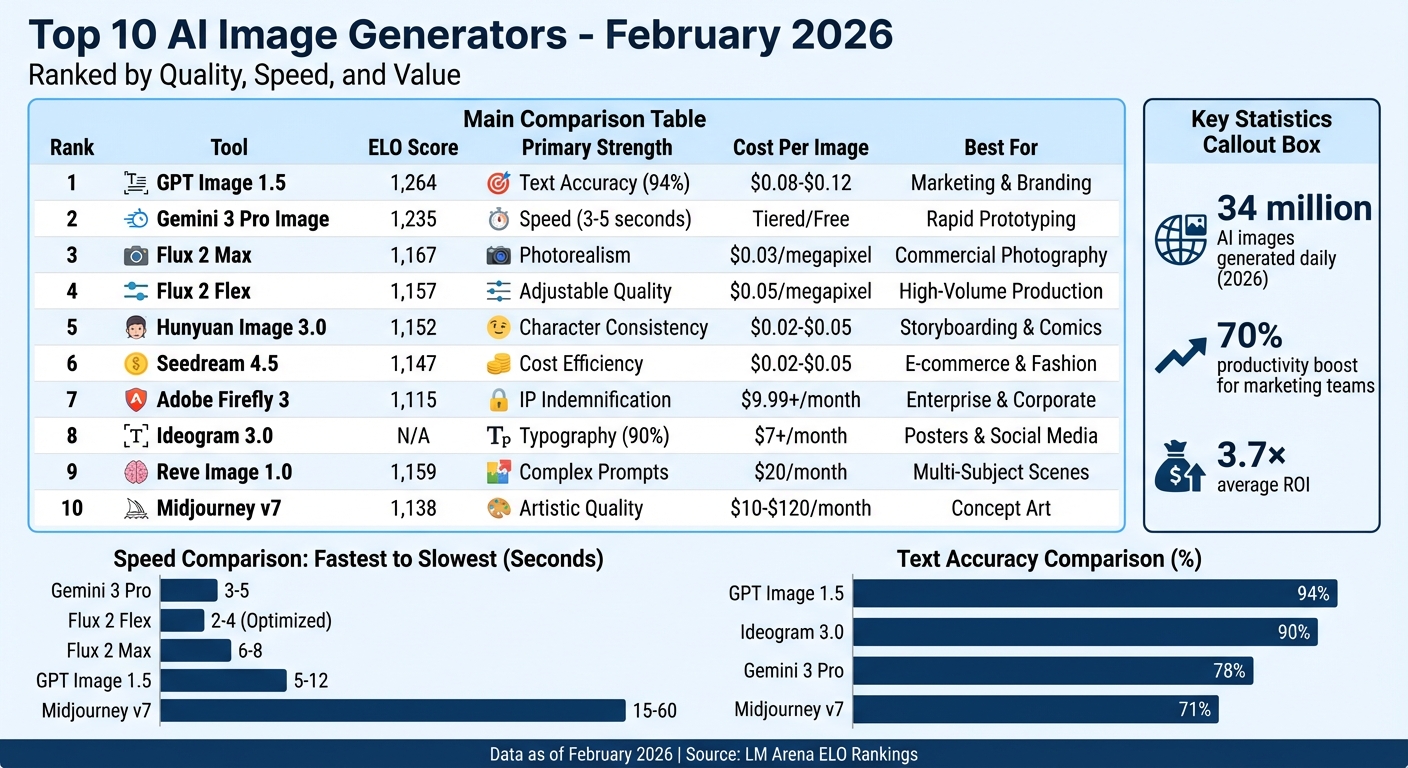
AI image generators have become essential tools for creators, producing 34 million images daily by early 2026. This article ranks the top 10 tools based on quality, text accuracy, speed, and pricing. GPT Image 1.5 leads with a 94% text accuracy and professional-grade visuals, while Gemini 3 Pro Image delivers unmatched speed (3–5 seconds per image). Flux 2 Max excels in photorealism, and Seedream 4.5 offers cost-effective, high-quality outputs. For legal compliance, Adobe Firefly 3 stands out. Below is a quick comparison of their strengths and ideal use cases.
Quick Comparison
| Tool | Strength | Weakness | Cost Per Image | Best For |
|---|---|---|---|---|
| GPT Image 1.5 | Text accuracy (94%) | High cost | $0.08–$0.12 | Marketing & branding |
| Gemini 3 Pro | Speed (3–5s) | Lower artistic depth | Tiered/Free | Rapid prototyping |
| Flux 2 Max | Photorealism | Technical complexity | $0.03 per megapixel | Commercial photography |
| Seedream 4.5 | Cost efficiency | Lower ELO rating | $0.02–$0.05 | E-commerce & fashion |
| Adobe Firefly 3 | IP indemnification | Generic output | $9.99+/month | Enterprise & corporate use |
| Ideogram 3.0 | Typography | Limited versatility | $7+/month | Posters & social media |
| Hunyuan Image 3.0 | Character consistency | N/A | $0.02–$0.05 | Storyboarding & comics |
| Reve | Complex prompts | Limited awareness | $20/month | Multi-subject scenes |
| Midjourney v7 | Artistic quality | Public galleries | $10–$120/month | Concept art |
Each tool shines in specific use cases, whether it's speed, text rendering, or photorealism. GPT Image 1.5 leads for businesses needing polished visuals, while Gemini 3 Pro Image is perfect for fast-paced workflows. For budget-conscious teams, Seedream 4.5 delivers quality at a lower cost.
Top 10 AI Image Generators Comparison Chart 2026
AI Image Generators Ranked from Worst to Best (2026)
1. GPT Image 1.5 (OpenAI)
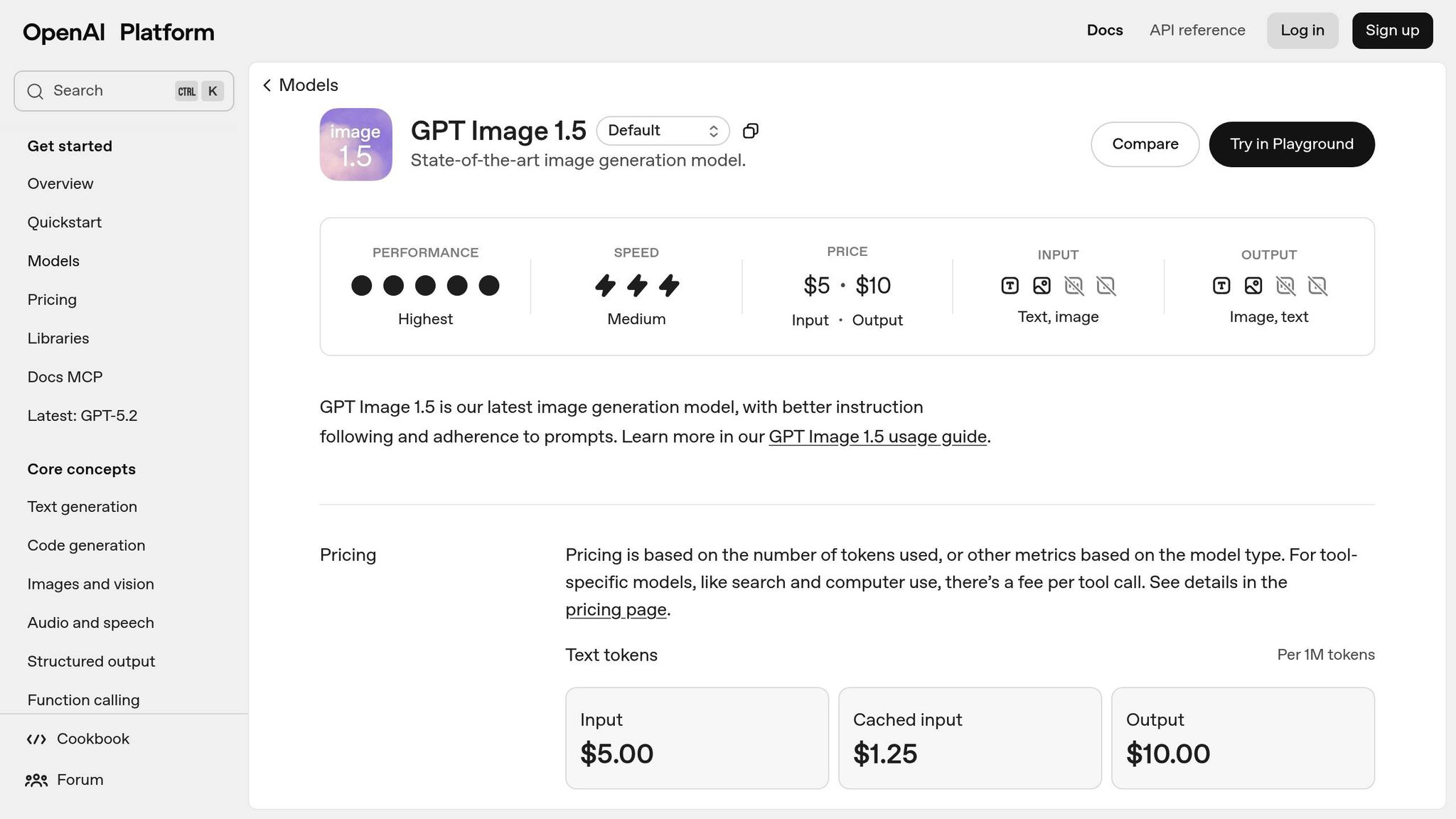
GPT Image 1.5 stands out in the field, leading multiple benchmarks and earning top scores across various categories. OpenAI describes its output as having a "commercial photography" aesthetic - images that are polished, well-lit, and ready for use in high-end marketing campaigns. Let’s break down how these strengths translate into its performance in output quality, text accuracy, speed, and pricing.
Output Quality
The model delivers impressive results, especially with its ability to handle iterative edits. Users can add, remove, or blend elements while maintaining lighting, composition, and subject consistency. This feature is particularly helpful for preserving brand elements like logos and color schemes. It also excels with complex prompts, such as those specifying lens types, lighting conditions, or historical settings, achieving 87% adherence in blind tests. However, its maximum resolution is limited to 2048×2048, which falls short when compared to competitors offering 4K output.
Text Rendering Accuracy
When it comes to text, GPT Image 1.5 shines. In tests focused on typography, it achieved a 94% accuracy rate, outperforming competitors like Gemini 3 Pro Image (78%) and Midjourney v7 (71%). Real-world results show it correctly renders complex text, such as magazine headlines and product packaging, with an 85–90% accuracy rate.
According to an expert from the Seedance Team, "GPT Image 1.5 is the first model where I'd actually trust text-heavy graphics."
One mid-size consumer goods company reported dramatic improvements after integrating GPT Image 1.5 into their workflow. They reduced campaign asset creation time from 4 days to just 1.5 days, cut manual correction time for AI-generated text by 80%, and slashed monthly production costs from $12,000 to $5,400 - all while increasing output by 2.3×.
Generation Speed
The model’s ability to handle text with precision is paired with fast image generation. Standard-quality images are produced in 5–12 seconds, while HD images take 15–20 seconds. While Gemini 3 Pro Image is faster at 3–5 seconds, GPT Image 1.5’s speed is more than sufficient for professional workflows.
Pricing
Pricing is structured per 1024×1024 image: $0.009 for Low Quality, $0.034 for Medium Quality, and $0.133 for High Quality. It’s also accessible through ChatGPT Plus and Pro plans at $20 per month. For larger-scale needs, enterprise plans start at $5,000 per month for 50,000+ images, offering SLA guarantees and dedicated account management. These pricing options make GPT Image 1.5 an attractive choice for businesses looking for professional-grade image generation.
2. Gemini 3 Pro Image (Google)
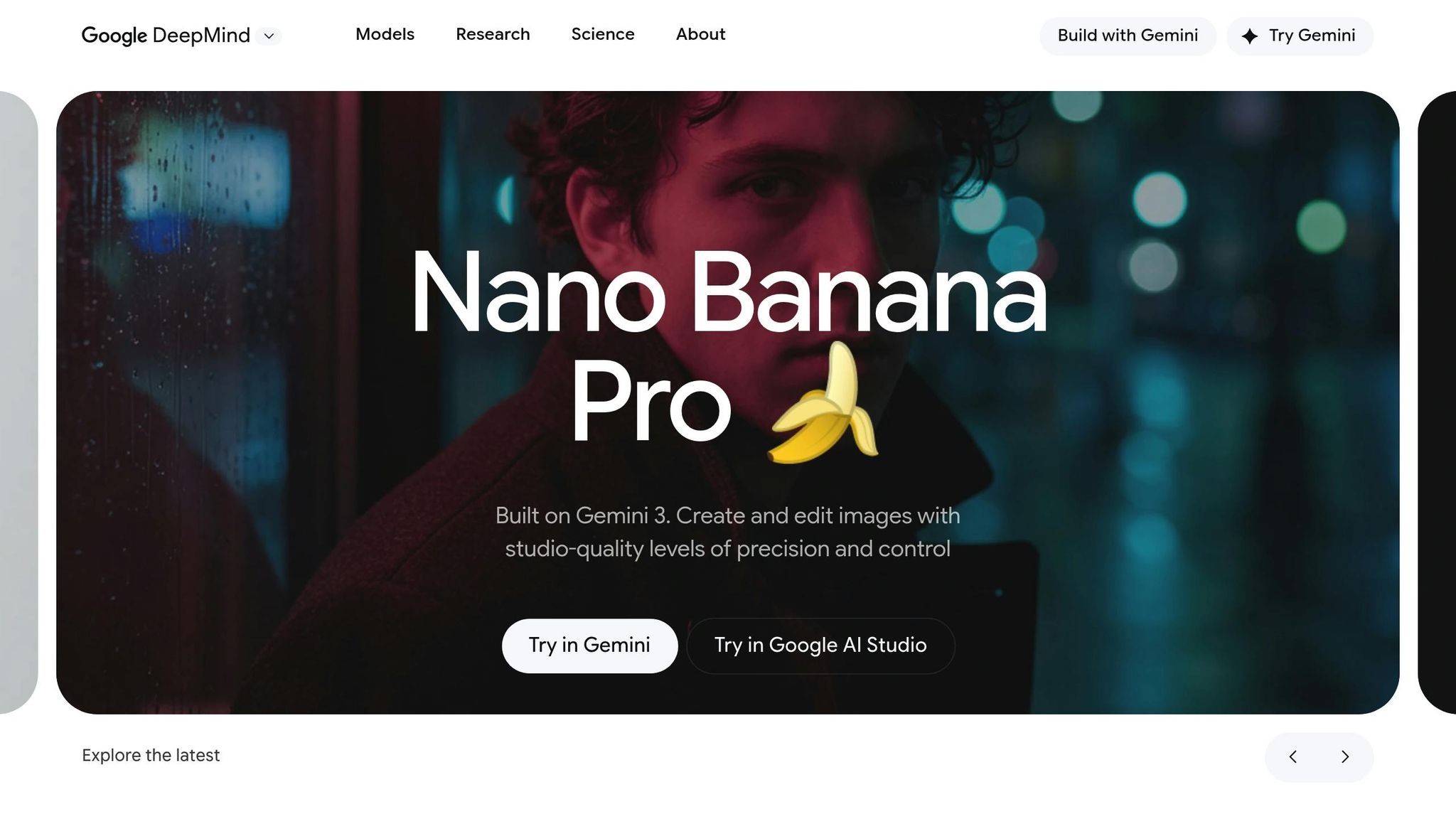
Gemini 3 Pro Image, built on the Nano Banana Pro architecture, holds the second spot with an LM Arena ELO score of 1,235 - just 29 points behind GPT Image 1.5. Its standout feature? Speed. It’s the fastest tier-1 image generator, delivering results in just 3–5 seconds. While it shines in rapid production, its output quality can vary depending on the task, making it a great choice for workflows where speed takes precedence over artistic depth.
Output Quality
Gemini 3 Pro Image is a strong performer in creating photorealistic visuals, especially for presentations, documents, and search-driven tasks. It integrates effortlessly with Google Workspace tools like Docs, Slides, and Sheets, and even pulls real-time data from Google Search and Maps for accurate geographical details. This feature ensures precision when location-specific imagery is needed. Impressively, it can generate 10–20 images simultaneously without any noticeable lag.
That said, its illustrative capabilities leave something to be desired. As Jim MacLeod, a Brand and Digital Strategist, puts it:
"Nano Banana has great for creating photo-realistic imagery, but this is just boring. The composition is clear, but it's not engaging".
The model supports resolutions of up to 2,048×2,048 pixels by default, with an experimental mode that can push that up to 4,096×4,096 pixels. While its automation and image clarity are noteworthy, its ability to handle text within images is less impressive.
Text Rendering Accuracy
Typography is one of Gemini 3 Pro Image's weaker points. It achieves 78% accuracy in text rendering, which pales in comparison to GPT Image 1.5's 94%. For projects involving text-heavy designs - like product packaging or magazine layouts - this shortfall could be a significant drawback. Still, its rapid generation speed helps offset this limitation for many users.
Generation Speed
Speed is where Gemini 3 Pro Image truly excels. According to Axis Intelligence, it can produce publication-ready images in just 3–5 seconds, far outpacing GPT Image 1.5, which takes 8–12 seconds. This makes it an excellent tool for brainstorming sessions, quick iterations, and real-time collaborations. If your priority is speed over artistic range, this model is hard to beat.
Pricing
Access to Gemini 3 Pro Image is included in the Google AI Pro subscription, which costs $20 per month. For enterprise API users, bulk discounts reduce per-image costs by 30–40%. The pricing reflects its emphasis on speed and seamless integration with Google's ecosystem, rather than artistic flexibility.
3. Flux 2 Max (Black Forest Labs)
Flux 2 Max takes the third spot with an LM Arena ELO score of 1,167. This ranking is consistent with evaluations of output quality among top-tier tools. Built on a 32-billion parameter latent flow matching architecture, it delivers photorealistic, production-ready images at a native 4-megapixel resolution (2,048×2,048 pixels) without relying on external upscaling. Its hybrid design combines the Mistral‑3 24B parameter vision-language model with a rectified flow transformer, which Black Forest Labs describes as offering "the highest quality output in the FLUX.2 family".
Output Quality
Flux 2 Max stands out for its ability to replicate accurate lighting physics, such as subsurface scattering on skin and realistic reflections on materials like chrome and fabric. It can process up to 10 reference images at once, ensuring a consistent style across outputs. For example, the Seedance Team used this model to create a 50-image product campaign in just 2 hours - a task that would typically take an entire day. Beyond photorealism, it includes real-time web grounding, enabling it to depict current events and specific locations with precision. In benchmarks, it achieved a 63.6% human-preference win rate against other open-weight models, highlighting its competitive edge.
Text Rendering Accuracy
Flux 2 Max excels in typography, supporting Latin, Cyrillic, and CJK characters with precise kerning. It can also match brand colors using HEX codes. During a January 2026 test by the Vidguru Team, it created a clean, readable infographic about coffee brewing with 100% accurate text and numbers. In contrast, a competing model struggled with unwanted capitalization issues. While its text accuracy (slightly below GPT Image 1.5's 94%) leaves room for improvement, it remains a reliable choice for standard typography and UI mockups.
Generation Speed
Using an RTX 4090 GPU, Flux 2 Max generates 1,024×1,024 images in 6–8 seconds with FP8 precision. It first produces low-resolution drafts before finalizing 4-megapixel renders.
Pricing
Flux 2 Max charges $0.03 per megapixel, which translates to approximately $0.03 for a 1,024×1,024 image and $0.045 for a 1,920×1,080 image. For large-scale users, generating 1 million images costs around $30,000 - significantly lower than the $40,000–$50,000 range for Midjourney. Commercial licensing for self-hosted deployment is priced at $1,999 per month for the Dev variant, while most users access the Max version via a proprietary API. This pricing structure makes it an appealing option for studios and agencies that demand consistent, high-quality results.
4. Flux 2 Flex (Black Forest Labs)
Coming in fourth with an LM Arena ELO score of 1,157, Flux 2 Flex offers a range of adjustable inference steps and guidance scales, making it a versatile tool for balancing image quality, speed, and cost. Built on a 32-billion parameter latent flow matching architecture, this model is designed for users who want creative freedom, especially for tasks like fantasy landscapes, surreal compositions, and character designs. Let’s break down its performance features.
Output Quality
Flux 2 Flex produces native 4-megapixel images (up to 2,048×2,048 pixels) and can handle up to 10 reference images in a single run. While this sounds impressive, its ability to manage complex scenes falls short compared to Flux 2 Max, earning it a professional benchmark rating of 3 out of 5. The model’s adjustable settings require careful attention to detail in prompts. Black Forest Labs suggests using JSON-structured prompts with defined keys like scene, subjects, style, and lighting. For best results, they recommend starting with a guidance scale between 2.5 and 4.0.
Text Rendering Accuracy
When it comes to text rendering, Flux 2 Flex stands out with its "Typography Master" title among open-weight-capable models. It performs exceptionally well with UI mockups, infographics, and tasks requiring precise brand-specific HEX codes. The model supports Latin, Cyrillic, and CJK characters and integrates text contextually - making it appear naturally embedded, such as printed on surfaces or carved into objects. However, in highly intricate scenarios, its text rendering slightly trails behind GPT Image 1.5.
Generation Speed
Under standard settings, Flux 2 Flex generates 1,024×1,024 images in 8–12 seconds. Optimized setups can reduce this time to just 2–4 seconds. For cost-effective workflows, Black Forest Labs suggests creating initial drafts using 10–15 inference steps and refining selected outputs with 20–30 steps for enhanced detail.
Pricing
Flux 2 Flex is priced at $0.05 per megapixel through its API, which works out to about $0.05 for a 1,024×1,024 image. This pricing places it between Flux 2 Pro at $0.03 per megapixel and Flux 2 Max at $0.07 per megapixel. For those who prefer self-hosted options, a Dev variant is available for commercial production at $1,999 per month.
5. Hunyuan Image 3.0 (Tencent)
Hunyuan Image 3.0 secures the fifth spot on the list with an impressive LM Arena ELO score of 1,152. As the largest open-source image generator, it features an 80-billion-parameter Mixture of Experts framework, activating 13 billion parameters per generation. Back in October 2025, it held the top position on the LM Arena leaderboard before being surpassed by newer models.
Output Quality
This model excels in delivering detailed compositions, often showcasing distinct Asian influences. Trained on 5 billion image-text pairs, video frames, and 6 trillion tokens, it demonstrates remarkable accuracy in rendering specific historical themes, such as 1920s laboratory equipment, even without direct instructions. Its ability to handle prompts exceeding 1,000 characters sets it apart from many Western models, which typically cap at around 400 characters. Additionally, it consistently produces high-quality anime, manga, and other Asian-themed visuals.
Text Rendering Accuracy
Hunyuan Image 3.0 shines in text and layout precision, thanks to its semantic alignment layer trained on 480 million graphic design examples. It handles intricate layouts, including vertical text used in Chinese typography and multi-line formats for posters and infographics. The model supports native-level English and Chinese output (both Simplified and Traditional), ensuring proper stroke order and character proportions.
Photorealism
When it comes to photorealistic outputs, Hunyuan Image 3.0 delivers exceptional results. Its images feature detailed textures, realistic reflections, and lifelike shadows. The model also supports depth-aware synthesis and multi-view rendering, making it highly useful for 3D engineering and animation projects. Tencent emphasizes its high prompt accuracy, which can significantly reduce creative production time from hours to just minutes.
Generation Speed
The model's generation speed varies depending on the platform and settings. Standard API requests for 1,024×1,024 images take around 5–15 seconds, while optimized cloud providers can cut this down to 2–4 seconds. On platforms like Yuanic.com, high-quality settings require 20–40 seconds per generation.
Pricing
Hunyuan Image 3.0 is available for free under the Apache 2.0 license for self-hosting, though it does require high-end hardware. For those using Tencent Cloud's API, the cost is approximately $0.10 per megapixel. Alternative API providers offer more affordable options, with prices ranging from $0.02 to $0.05 per image. Yuanic.com, for example, starts at around $0.01 per generation.
6. Seedream 4.5 (ByteDance)
Seedream 4.5 boasts an impressive LM Arena score of 1,147. Designed for heavy-duty commercial use in e-commerce, marketing, and advertising, this model produces reliable, high-quality visuals ready for production. It supports native 4K image generation at 2,048×2,048 pixels and can create up to four variations from a single prompt.
Output Quality
This model delivers polished, professional visuals with refined textures and expert lighting. It shines in rendering realistic fabrics, skin tones, and glass reflections, making it a standout choice for premium product displays and marketing campaigns. Seedream 4.5 is particularly effective for product photography, lifestyle imagery, and fashion lookbooks - areas where maintaining brand consistency is critical. Its attention to lighting and texture details makes it a go-to for creating marketing assets that look sharp and sophisticated.
"Seedream 4.5 isn't the flashiest model on the block, but it's the one that gets the job done cleanly, predictably, and fast." - Siray.AI
Text Rendering Accuracy
Seedream 4.5 sets itself apart with its ability to handle text rendering. It excels at placing text on 3D objects like boxes, cans, and bottles, capturing the correct perspective, curves, and shadows. While it occasionally struggles with more intricate, multi-line layouts that use varying font sizes, it still outperforms many competitors when it comes to creating realistic labels and signage in photorealistic settings. This precision in text rendering enhances its overall usability for commercial projects.
"Seedream 4.5 handles text on 3D objects (like boxes, cans, and bottles) more naturally in photorealistic scenes. The curves, perspective, and shadows on labels looked very convincing." - z-image.ai
Photorealism
Beyond text accuracy, Seedream 4.5 excels in photorealism. It produces cleaner studio lighting, ensures better environmental consistency, and minimizes common issues like distorted hands. With a generation speed of roughly 6 seconds for a 4K image, it’s perfect for marketing teams that need to churn out thousands of assets each month without compromising on quality.
Pricing
Seedream 4.5 is priced between $0.02 and $0.05 per image. Available via BytePlus, it offers flexible B2B pricing plans with volume discounts, making it a practical option for enterprise-level production. Additionally, platforms like Siray.AI provide free credits upon signup, with no credit card required.
sbb-itb-212c9ea
7. Adobe Firefly 3
Adobe Firefly 3 has carved a niche for itself among image generators by focusing on brand-safe content creation. It boasts an LM Arena score of 1,115. Unlike many competitors, Firefly 3 is trained exclusively on Adobe Stock assets, openly licensed images, and public domain materials. This approach ensures robust intellectual property (IP) protection, making it a trusted choice for enterprises and brands concerned about copyright compliance.
Output Quality
When it comes to delivering polished, professional visuals, Firefly 3 excels. SaaS CRM Review gave it a 7/10 for overall image quality and a perfect 10/10 for commercial clarity. It's particularly effective for creating product photography, corporate visuals, and marketing assets. One standout feature, "Style Reference", allows users to upload brand assets, ensuring visual consistency across all generated content.
"Firefly feels less experimental than some other tools, but much more practical for production work that needs to ship." - Jim MacLeod, Brand and Digital Strategist
The latest update, Image Model 5, brings native 4-megapixel resolution and a 32% improvement in hand and anatomy accuracy. Testing results include an 8.5/10 score for photorealistic portraits and a 9/10 for product photography. However, Firefly 3 isn't without its flaws - issues like synthetic lighting effects, robotic human features, and inconsistent text rendering (with accuracy below 45% for complex layouts) still occur.
Generation Speed
Firefly 3 generates images in 20 to 40 seconds. Its seamless integration with Adobe tools like Photoshop and Illustrator adds to its appeal, offering features such as "Generative Fill" and "Generative Expand".
Pricing
Firefly 3 offers competitive pricing for its capabilities. Plans start at $9.99/month for 2,000 credits, with a Pro tier available at $19.99/month for 4,000 credits. For users wanting to test the waters, a limited free tier is also available.
8. Ideogram
Ideogram 3.0, launched in March 2025, has become a favorite among typography and graphic design enthusiasts. Its ability to render text with 90% accuracy - compared to the 30% accuracy of other tools - makes it a go-to for creating logos, posters, social media graphics, and marketing materials.
Output Quality
On the ImageBattle leaderboard, Ideogram scores an impressive 7.65/10 overall. It shines particularly in text rendering within images (8.10/10) and graphic design (8.30/10). Features like the "Magic Prompt" expand user inputs into detailed, cohesive descriptions, enhancing design consistency. Additionally, the tool provides "Color Palette Control", letting users lock specific hex codes, and "Style References", allowing up to three guiding images for inspiration.
"Ideogram AI has solved the text rendering problem that plagues virtually every other AI image generator." – Jim MacLeod, Brand and Digital Strategist
Text Rendering Accuracy
Ideogram excels in handling complex text arrangements, including multi-line typography, stylized fonts, and text displayed on curved surfaces or 3D objects. In blind tests, 78% of participants couldn’t distinguish its creations from professional photography. However, its strength in text rendering contrasts with its limitations in multi-person scenes, where it often struggles with facial accuracy and proportions.
Photorealism
Though its "Realistic" mode can produce commercially usable images, Ideogram falls short in achieving true photorealism. Lighting and shadow effects sometimes appear artificial, which is reflected in its photorealistic people score of 7.70/10.
Generation Speed
Speed is another key advantage. The 2a Turbo model generates images in just 5 seconds, while the standard 2a model takes 10 seconds. This speed makes it especially useful for high-volume design tasks.
Pricing
Ideogram uses a credit-based pricing system that caters to various needs:
- Free Plan: Includes 20 slow image generations per day, though all outputs are public.
- Basic Plan ($7/month): Offers around 1,600 images per month.
- Plus Plan ($20/month): Includes 1,000 priority credits, unlimited slow credits, and private generations - offering excellent value at roughly 33% less than similar plans.
- Pro Plan ($60/month): Designed for agencies, this plan provides 3,000 priority credits and bulk CSV generation for managing large-scale projects.
9. Reve
Reve Image 1.0 stands out in the world of AI image generation, boasting an impressive ELO score of 1159 on the Artificial Analysis Image Arena.
Output Quality
Reve scores a strong 9.5/10 for prompt adherence and a 7.7/10 for visual fidelity. It excels in creating images with clear spatial relationships and well-defined camera setups. However, it faces challenges when tasked with intricate organic details or large, complex crowds.
"Reve doesn't guess, it builds. If you speak its language with clarity and structure, it will deliver exactly what you ask for." – Brian Dalton, AI Image Expert
In addition to its visual capabilities, Reve's text rendering abilities set it apart from many competitors.
Text Rendering Accuracy
Reve handles captions and text display with precision, making it an excellent choice for logo design and advertising. While it performs well with short captions, its accuracy can drop when dealing with more complex, text-heavy projects like infographics.
Photorealism
Reve shines in staged studio settings, delivering photorealistic results with authentic skin textures, natural lighting, and lifelike poses. However, it has limitations when dealing with intricate organic environments or achieving "pixel-perfect physics." For example, urban scenes or historical settings requiring atmospheric depth may appear less convincing.
These photorealistic results are paired with impressive speed.
Generation Speed
Reve generates images in under 20 seconds at a native resolution of 2048×2048, with an optional upscaling feature for 4K (4096×4096) resolution.
Pricing
Reve offers competitive pricing at $5 for 500 generations - roughly 1¢ per image. New users get 100 free credits at signup and 20 free daily generations, with full ownership of their content. For heavier usage and private image creation, a Pro plan is available at $20/month.
10. Midjourney
Midjourney v7 scores an LM Arena ELO rating of 1,138, making it a standout option for its artistic capabilities. While it doesn’t dominate in areas like prompt accuracy or text rendering, its strength lies in delivering visually stunning images with cinematic lighting, painterly textures, and emotional resonance.
Output Quality
Midjourney earns a solid 9/10 for its artistic detail and composition. It’s particularly well-suited for editorial illustrations and cinematic visuals, excelling in complex lighting scenarios such as subsurface scattering and intricate reflections. These features give its images a professional photography vibe.
"When it comes to skin pores, lighting imperfections, and 'soul' in the eyes, Midjourney v7 is currently unmatched." – Sirak Ghroyan, Design Expert
However, its text rendering accuracy is only 71%, a significant gap compared to GPT Image 1.5's 94%. This makes Midjourney ideal for projects where artistic expression outweighs the need for precise prompt adherence - think concept art or creative explorations rather than technical diagrams or text-heavy designs. Its artistic strengths also bolster its photorealistic capabilities.
Photorealism
Midjourney excels in creating lifelike textures, with impressive attention to details like skin pores, fabric folds, and natural lighting imperfections. Advanced tools like Character Reference (--cref) ensure consistent facial features, while Style Reference (--sref) helps replicate specific lighting setups or color palettes. These features make it a valuable tool for storyboarding and maintaining visual consistency across creative projects.
Generation Speed
In terms of speed, Midjourney’s Fast Mode generates images in about 15 seconds. Standard mode takes 30–60 seconds, and Relax mode ranges between 2–10 minutes. This earns it a 7/10 rating for speed.
Pricing
Midjourney operates on a subscription-only basis. The Basic Plan costs $10/month (approximately 200 images), while Standard, Pro, and Mega Plans range from $30 to $120/month, depending on GPU hour needs. Free trials are currently unavailable due to high demand. Subscribers retain ownership of their generated images, but companies with annual revenues over $1 million are required to use either the Pro or Mega plans.
Strengths and Weaknesses
This section breaks down the practical trade-offs of various tools, focusing on how they perform in real-world scenarios. Each tool brings its own set of advantages and limitations to the table.
GPT Image 1.5 is a standout in text rendering, achieving an impressive 94% accuracy. However, its cost - ranging from $0.08 to $0.12 per image - makes it a pricier option.
Gemini 3 Pro Image is the fastest tool, with image generation times of just 3–5 seconds. That said, its speed comes at the expense of artistic quality.
Flux 2 Max shines in photorealism and customization but demands technical expertise to operate effectively. On the other hand, Flux 2 Flex offers faster generation times (2–4 seconds) with a slight dip in quality.
Adobe Firefly 3 is particularly appealing for enterprise users, thanks to its IP indemnification feature. However, its outputs tend to lack the artistic flair seen in competitors like Midjourney.
For budget-conscious users, Seedream 4.5 provides excellent value. It delivers around 85% of the quality of top-tier tools at just 40% of the cost. Similarly, Hunyuan Image 3.0 is a cost-effective choice ($0.02–$0.05 per image) and excels in character consistency, making it ideal for storyboarding and comics.
Ideogram 2.0 is a specialist in typography, making it perfect for posters and social media graphics. However, its narrow focus may limit its versatility. Reve handles complex, multi-subject scenes with precision, though it lacks widespread recognition.
Some tools come with specific drawbacks. For instance, default public outputs in free tiers may not suit projects requiring privacy. Additionally, strict content moderation in proprietary models from OpenAI and Google can sometimes block valid creative prompts.
Here’s a quick comparison of the tools, summarizing their strengths, weaknesses, costs, and ideal use cases:
| Tool | Primary Strength | Primary Weakness | Cost Per Image | Best For |
|---|---|---|---|---|
| GPT Image 1.5 | Text accuracy (94%) | High cost | $0.08–$0.12 | Marketing & branding |
| Gemini 3 Pro | Speed (3–5s) | Lower artistic quality | Tiered/Free | Rapid prototyping |
| Flux 2 Max | Photorealism | Technical complexity | Free/Cloud | Commercial photography |
| Flux 2 Flex | Speed (2–4s) | Slightly reduced quality | Free/Cloud | High-volume production |
| Hunyuan Image 3.0 | Character consistency | - | $0.02–$0.05 | Storyboarding/comics |
| Seedream 4.5 | Cost efficiency | Lower ELO rating | $0.02–$0.04 | E-commerce/fashion |
| Adobe Firefly 3 | IP indemnification | Generic output | Subscription | Enterprise/corporate |
| Ideogram 2.0 | Typography | Niche focus | $8+/month | Posters/social media |
| Reve | Complex prompts | Limited awareness | $20/month | Multi-subject scenes |
| Midjourney v7 | Artistic quality | Public galleries | $10–$120/month | Concept art |
Conclusion
As of February 2026, AI image generators have evolved into reliable production tools, with GPT Image 1.5 leading the pack thanks to its impressive 1,264 ELO score and 94% typography accuracy. Each of these tools shines in specific scenarios, making it easier to choose the best fit for your needs.
Gemini 3 Pro Image is a strong contender, delivering images in just 3–5 seconds, making it ideal for fast-paced prototyping and high-volume social media projects. For users who require technical photorealism or need local deployment for privacy, Flux 2 Max takes the third spot.
If your focus is on niche applications, Hunyuan Image 3.0 is a go-to for anime and character design, offering competitive pricing at $0.02–$0.05 per image. Meanwhile, Adobe Firefly 3 stands out for teams needing full IP indemnification. For budget-conscious teams, Seedream 4.5 delivers 85% of the quality of premium tools at just 40% of the cost.
The broader impact of these tools is undeniable. With 34 million AI-generated images created daily, marketing teams are reporting a 70% boost in productivity and a 3.7× return on investment. As Sirak Ghroyan, Founder of Desinance, aptly puts it:
"The era of 'prompt and pray' is over. In 2026, AI image generation has graduated from a novelty act to a critical production pipeline".
FAQs
What criteria are used to rank the best AI image generators in February 2026?
The February 2026 rankings for AI image generators focus heavily on output quality, assessing how well models create high-caliber images in a range of styles. Whether the goal is photorealism, artistic expression, or images tailored for specific purposes like marketing or design, the ability to deliver visually impressive results is a top priority.
Beyond image quality, user-friendliness plays a key role. This includes how intuitive the tools are, their creative flexibility, and how seamlessly they fit into different workflows. Another critical factor is their performance in practical scenarios, such as delivering consistent results across prompts and incorporating feedback from users. By balancing technical performance with real-world usability, these rankings aim to showcase the tools best suited for a variety of creative needs.
What makes GPT Image 1.5 so accurate at generating text within images?
GPT Image 1.5 is designed to excel at generating clear and consistent text within images. Thanks to its advanced algorithms, it ensures that characters remain sharp and properly aligned. This makes it a go-to tool for creating text-heavy visuals like infographics, presentations, or marketing assets.
Its focus on precision means the text in generated images is not only easy to read but also visually seamless. Whether you're working on professional designs or creative projects, GPT Image 1.5 offers a dependable solution for producing polished and attractive visuals.
What’s the difference between photorealism and artistic quality in AI-generated images?
Photorealism and artistic quality in AI-generated images serve different purposes and styles, each catering to specific needs.
Photorealism aims to produce images that closely mimic real-life photographs. It emphasizes precise details, textures, lighting, and perspective to create visuals that feel authentic. This approach is particularly useful for tasks like product visualization, architectural renders, or realistic portraits.
On the other hand, artistic quality leans into creativity and stylization. These images often feature bold color palettes, exaggerated forms, or imaginative compositions. The focus here is on expression and originality, making it ideal for digital art, concept designs, or other creative endeavors.
Ultimately, the choice between photorealism and artistic quality depends on your project’s goals. If you need lifelike accuracy, photorealism is the way to go. For more expressive and imaginative results, artistic quality takes the lead.