Productivity
10 Best AI Agents in 2026: Apps That Actually Do the Work for You
Compare the top 10 AI agents of 2026 — autonomous apps that automate workflows, integrate with business tools, and boost productivity.

10 Best AI Agents in 2026: Apps That Actually Do the Work for You
AI agents have evolved into powerful tools that handle complex, multi-step tasks independently. Unlike simple chatbots, these agents can make decisions, execute workflows, and integrate with external tools to save time and boost productivity. By early 2026, 85% of enterprises had adopted AI agents, driving 22% higher employee productivity and saving companies millions annually. The global AI agent market reached $7.63 billion in 2025, growing at nearly 50% annually.
Here’s a quick look at the 10 standout AI agents in 2026:
- AI Apps: A directory of 1,900 tools for workflow automation, offering multi-agent orchestration and integration with tools like Salesforce and GitHub.
- Zapier Agents: Automates decisions and workflows across 8,000+ apps, perfect for managing intricate processes.
- Arahi AI: Combines reasoning with action, automating tasks like CRM updates and lead qualification.
- Botpress: Handles multi-step workflows with adaptive reasoning and memory, integrating with tools like Slack and Shopify.
- Hive: An all-in-one workspace with an AI assistant, Buzz, for project management, task planning, and integrations.
- Motion: An "AI Employee SuperApp" that organizes tasks and meetings while offering role-specific AI assistants.
- Reclaim: Optimizes calendars by dynamically scheduling tasks, meetings, and habits based on priorities.
- Saner.AI: Turns unstructured thoughts into actionable plans, ideal for managing information overload.
- ChatGPT: Offers advanced task automation, from coding to financial modeling, with integrations for web browsing and real-world transactions.
- Notion AI: Fully autonomous agents that manage workflows, databases, and tasks triggered by events like Slack messages.
These tools are transforming how businesses operate by automating repetitive tasks, improving efficiency, and cutting costs. Whether you're looking to streamline project management, handle customer support, or optimize scheduling, there's an AI agent for your needs.
Quick Comparison
| AI Agent | Key Features | Best For | Price Range |
|---|---|---|---|
| AI Apps | Directory of 1,900 tools, multi-agent workflows | Workflow automation | Free to $50/month |
| Zapier Agents | Automates across 8,000+ apps, human-in-the-loop | Complex workflows | Free to $33.33/month |
| Arahi AI | Combines reasoning with execution, CRM updates | Business operations | $19–$499/month |
| Botpress | Adaptive workflows, LLM-powered reasoning | Customer support, lead management | Free to $2,000/month |
| Hive | AI assistant Buzz, project management tools | Creative and marketing teams | $5–$12/user/month |
| Motion | AI task planner, role-specific assistants | Task and meeting management | $29–$69/user/month |
| Reclaim | Dynamic calendar optimization | Scheduling and prioritization | Free to $18/user/month |
| Saner.AI | Organizes unstructured thoughts, energy-aware scheduling | Managing information overload | Free to $16/month |
| ChatGPT | Advanced task automation, web browsing | Research, coding, data analysis | Free to $200/month |
| Notion AI | Event-driven agents, database integration | Workflow management | $20/user/month + credits |
These tools are reshaping productivity by replacing repetitive tasks with smart automation. Whether you're a solo professional or part of a large enterprise, there's an AI agent to simplify your work.
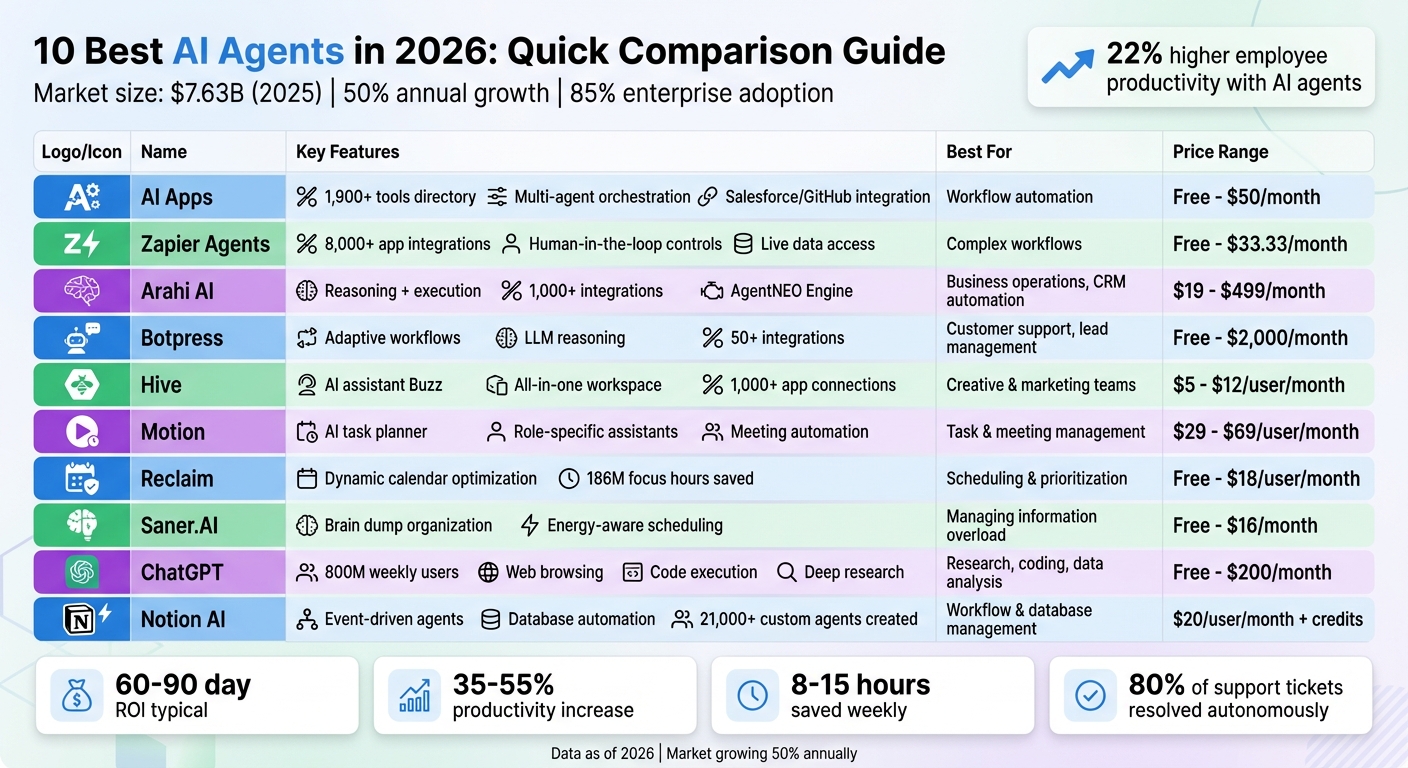
Top 10 AI Agents 2026: Features, Pricing & Best Use Cases Comparison
Best AI Agents for Project Management 2026 (Zapier Builds Them All)
sbb-itb-212c9ea
1. AI Apps
AI Apps is a directory featuring 1,900 AI tools designed to simplify workflow automation. Acting as a one-stop platform, it allows users to compare features, pricing, and applications across categories like AI tools for content creators, video tools, and business automation. This eliminates the hassle of testing multiple disconnected apps. Let’s dive into the automation capabilities that make these tools stand out.
Task Automation Capabilities
Modern AI tools listed in the directory can independently plan system architectures, analyze code, and debug issues. They’re also adept at handling unstructured inputs, such as emails or support tickets, automatically updating CRM systems or generating relevant documents.
One standout feature is multi-agent orchestration. Here, specialized AI agents work together as a coordinated team to handle complex business operations. This approach helps users pinpoint solutions that bring measurable efficiency improvements to their workflows.
Real-World Applications
The directory showcases tools making a tangible impact across various industries. For instance, JPMorgan Chase introduced its COiN agent in 2026, slashing document review time from 360,000 manual hours to mere seconds while enhancing the accuracy of legal analysis. In healthcare, Hippocratic AI developed a tool for medical imaging that matches or exceeds the performance of seasoned radiologists. Reports indicate that companies using AI-driven workflow tools experience productivity increases of 35% to 55%, with users saving 8 to 15 hours of manual work weekly. Some implementations even deliver returns on investment within 60 to 90 days.
Integration with Other Tools
These AI tools seamlessly integrate with platforms like Salesforce, HubSpot, and GitHub, breaking down data silos. For example, specialized agents can automatically sync meeting notes, contacts, and lead information directly into CRMs. Development tools also connect with GitHub, streamlining version control and backend management.
"The best AI productivity tools fit your specific workflow rather than forcing you to adapt." – Lovable Team
By prioritizing integration, AI Apps ensures users can connect solutions to their existing tech ecosystems. This not only avoids creating new data silos but also leads to significant cost savings and improved workflow efficiency.
Cost-Effectiveness
AI Apps offers both free and paid tools, with pricing starting as low as $10 to $50 per month. These tools handle complex tasks while delivering returns on investment of 1.7× to 10× per dollar spent. Many tools also feature free tiers, allowing users to test workflows before committing to paid plans. Additionally, a multi-step verification process ensures the listed tools deliver faster decision-making - up to 40–60% quicker - and reduce costs for repetitive tasks by as much as 45%.
2. Zapier Agents
Zapier Agents bring a new level of intelligence to workflow automation, going beyond simple if-then rules. Unlike traditional automation tools, these agents make decisions, access live data, and adapt to complex, multi-step processes. With connections to over 8,000 apps, they can pull real-time data from platforms like HubSpot, Notion, Airtable, and Salesforce to guide their actions. This makes them ideal for managing intricate workflows.
Task Automation Capabilities
Zapier Agents are built to handle tasks that require judgment and flexibility. They can perform market research, analyze documents, prioritize support tickets, and even assign tasks to other specialized agents. For sensitive actions, such as sending customer emails or updating financial records, the platform includes human-in-the-loop controls, allowing approvals before execution.
By early 2026, 72% of enterprises were either using or testing AI agents, with 47% focusing specifically on data management tasks. Some companies are taking it further by deploying groups of specialized agents - referred to as "agentic squads" - to manage entire business functions like sales or content operations.
Real-World Applications
In late 2025, NisonCo streamlined its operations by replacing a team of three to five part-time researchers with a single Zapier Agent. This agent scans Google News and industry sources daily, generating more leads than the previous manual process - all under the supervision of just one part-time employee.
"What used to be done by a whole team of researchers is now handled by one person using AI, including Zapier Agents. We actually do more with fewer people." – Evan Nison, Founder, NisonCo
Other companies have seen impressive results, too. Slate generated over 2,000 qualified leads in one month by automating prospecting and data enrichment across multiple sources. Remote.com’s three-person IT team implemented agents that now resolve 28% of all IT requests, including password resets and software access. Grammarly cut lead sync errors by 87% in paid campaigns and saved its Support Ops team six hours daily by eliminating manual data entry. Arden Insurance Services reported saving $500,000 annually while automating over 34,000 work hours through Zapier automation.
Integration with Other Tools
Zapier Agents integrate effortlessly with existing tools, connecting to over 8,000 apps and offering 30,000 actions. They can pull live data from platforms like Google Drive, Asana, and HubSpot, ensuring decisions are always based on the latest information. A Chrome extension allows agents to follow users across the web, analyze content on the fly, and perform actions without requiring tab switching.
For developers, the Model Context Protocol (MCP) simplifies connections to Zapier's ecosystem without complicated custom integrations. You can also create hybrid workflows, combining AI-driven research with the reliability of traditional Zaps.
"The best thing about [Zapier Agents] is it's an [AI] agent, not a fixed LLM. Because it can do those Google searches, we're actually able to find live information we can rely on." – Usman Mahomed, Head of Product, egg
Cost-Effectiveness
Zapier Agents offer a free plan that includes 400 activities per month, live data access, web browsing, and the Chrome extension. Paid plans start at $33.33 per month for 1,500 activities, with enterprise-level options available for organizations needing advanced security and governance features. With 84% of enterprise leaders planning to increase investments in AI agents over the next year, Zapier Agents are positioned as a scalable solution.
The efficiency gains speak for themselves. At egg, Zapier Agents reduced sales research time from three hours to under five minutes. While 83% of leaders agree that AI error rates must stay below 5% for high-stakes tasks, 38% of enterprises prefer incorporating human oversight to ensure quality control.
3. Arahi AI
Arahi AI takes automation to the next level by combining AI reasoning with execution, enabling agents to not only suggest actions but also carry them out. Unlike traditional chatbots that simply provide text-based responses, Arahi's agents analyze situations, make decisions, and autonomously execute multi-step workflows across more than 1,000 business applications. At its core is the AgentNEO Engine, which offers 10x the contextual understanding of standard AI platforms and includes automatic error recovery for smoother operations.
Task Automation Capabilities
With its no-code agent builder, Arahi AI allows users to create fully functional AI agents in just minutes using natural language prompts. These agents can automate a wide range of tasks, including lead qualification and CRM updates, resolving support tickets, processing invoices, and monitoring competitors. One standout feature is its memory system, which retains details from past interactions, client data, and outcomes to ensure consistency and accuracy in future tasks.
The results speak for themselves: companies using Arahi AI report an average return of $3.70 for every $1 invested, with top performers achieving up to $10 per dollar spent.
"AI agents should reason AND act." – Arahi AI
By automating 40–80% of task time and reducing process errors by up to 90%, teams using Arahi AI can reclaim 10–12 hours of work per week. The platform also addresses customer inquiries efficiently, resolving around 80% of questions automatically and escalating only the most complex issues to human agents[42,46,48].
Integration with Other Tools
Arahi AI is designed to seamlessly integrate with over 1,000 popular tools, including Salesforce, HubSpot, Gmail, Slack, and Shopify. It also supports foundation models like GPT, Claude, and Gemini, giving users the flexibility to switch between models as needed. Agents can be triggered manually, scheduled for specific times, or activated automatically through app triggers and webhooks. Additionally, users can upload proprietary documents, such as PDFs and CSVs, to train agents with organization-specific data[48,50].
Cost-Effectiveness
Arahi AI delivers automation at a fraction of the cost of traditional solutions - roughly 90% less expensive. Its pricing begins with the Starter plan, which costs $19–$29 per month and includes 100 daily credits and access to more than 1,000 integrations. For businesses with greater demands, the Growth plan is available at $149 per month for 2,500 actions, while the Pro plan offers 6,000 actions for $349 per month. Enterprise options, priced up to $499 per month, provide full platform access and premium support[44,46,48].
With its combination of affordability and efficiency, Arahi AI has become a trusted tool for over 300 teams worldwide, boasting a 4.9/5 rating. Many users report mastering the platform within a single day. By streamlining workflows and cutting costs, Arahi AI is an ideal choice for businesses looking to optimize their operations.
4. Botpress
Botpress takes workflow automation to another level by equipping AI agents with adaptive reasoning. Instead of sticking to rigid, predefined workflows, the platform enables agents to handle exceptions intelligently. At the center of this system is the LLMz Inference Engine, which orchestrates agent behavior, maintains conversational memory, and securely executes JavaScript. With its use of Autonomous Nodes, Botpress agents can evaluate context and decide whether to follow structured workflows or rely on more flexible reasoning powered by large language models (LLMs).
Task Automation Capabilities
Botpress excels at managing multi-step workflows that demand both memory and decision-making. Its agents can handle tasks like processing refunds, managing subscription changes, qualifying leads, and managing applications. This ability highlights the shift from basic automation to AI-driven operations that are integral to business functions. The platform’s Knowledge Bases utilize Retrieval-Augmented Generation (RAG) to extract insights from unstructured data like PDFs and URLs. This enables agents to answer queries or trigger actions automatically, streamlining operations further.
In May 2025, Ruby Labs implemented Botpress agents across six subscription apps, handling over 4 million monthly support sessions. According to Bogdan Alexandru, Head of Support, the agents achieved a 98% resolution rate, with only 2% of cases needing human intervention. This adoption saved the company over $50,000 annually and cut manual support tickets by 65%.
"Instead of spending time training a model from scratch, we can quickly deploy AI capabilities that meet our exact needs."
– Bogdan Alexandru, Head of Support, Ruby Labs
Real-World Applications
The platform has proven its value in various industries. For instance, Waiver Consulting Group deployed a Botpress agent named "Waiverlyn" to qualify healthcare leads and schedule consultations through Google Calendar. This project resulted in a 25% increase in booked consultations and a ninefold boost in visitor engagement, achieving full ROI within just three weeks.
Similarly, VR Bank Südpfalz used an agent named "AVA" to automate over 3,000 annual real estate loan applications. By integrating with their CRM, the bank achieved a 56% containment rate and saved around $565,000 per year, with each interaction saving approximately €53.
Integration with Other Tools
Botpress integrates seamlessly with over 50 tools, including HubSpot, Salesforce, Zendesk, and Shopify. It is deployable across multiple platforms such as web, WhatsApp, Slack, Telegram, and SMS. The platform also supports a variety of LLM models, including GPT-4o, Claude, Gemini, and several open-source options. This flexibility allows teams to choose models based on their priorities, whether it’s cost, speed, or compliance.
Cost-Effectiveness
Botpress offers pricing plans tailored to different needs. The free tier includes 5 bots, 2,000 monthly inquiries, and 100 MB of vector storage. The Plus plan, priced at $89 per month, adds features like flow testing and human handoff. For larger teams, the Team plan costs $495 per month and includes 20 bots, 250,000 inquiries, and 2 GB of storage. Enterprise plans start at $2,000 per month, offering advanced security features and SLA guarantees. Botpress maintains a 4.2/5 rating, reflecting its ability to deliver powerful automation while remaining adaptable. These pricing tiers make it accessible for businesses of all sizes to implement AI-driven solutions.
5. Hive
Hive presents itself as an all-in-one AI workspace, aiming to replace multiple tools by combining project management, chat, time-tracking, and native proofing in one platform. At the heart of Hive is Buzz, an AI assistant that acts like a personal intern. Buzz can generate task plans from project briefs, draft emails, schedule meetings, and even predict potential bottlenecks that could disrupt timelines. The platform's Hive Automate feature connects with over 1,000 external apps - like Salesforce, Slack, Adobe Creative Cloud, and Jira - allowing teams to create complex workflows across platforms without needing to jump between tabs.
Task Automation Capabilities
One standout feature is Buzz-Built Projects, where Buzz generates project structures based on simple natural language prompts. Users can describe what they need, and Buzz automatically creates tasks, sets deadlines, and establishes dependencies. It also uses predictive analytics to identify potential delays, alerting managers before issues arise.
For creative teams, Hive offers native proofing tools and standardized Action Templates to streamline multi-stage approvals for files like images, PDFs, and MP4 videos. These tools save time and simplify the review process.
Real-World Applications
Hive has proven its value across various industries. Michele Fazio, SVP of PMO, shared that their organization now automates over 75% of processes using Hive, all while maintaining 100% customer satisfaction. David Gielchinsky, Director of Health Operations, highlighted how Hive helped consolidate tools and integrations, saving 810 hours in just one month while completing 48,600 approval rounds.
"Hive made the most sense for us. It has all the functionalities and integrations we need."
– David Gielchinsky, Director of Health Operations
Another example comes from Matt Seubert, Director of Digital Marketing, who used Hive to manage 78,000 quality tests in a single workspace. This change saved his team over 320 hours annually. These examples show how Hive simplifies workflows, saving both time and effort.
Integration with Other Tools
Hive goes beyond basic app connections by leveraging the Model Context Protocol (MCP). This protocol enables seamless integration of AI agents with databases, APIs, and cloud services without requiring complex configurations. It creates a unified system where data from external tools flows directly into Hive's action cards and project views. For sensitive areas like finance or HR, Hive allows teams to set approval thresholds, ensuring that AI agents need human authorization before making significant changes in external systems.
Cost-Effectiveness
Hive offers a free plan for up to two users, which includes unlimited projects and 200 automations. The Teams plan, starting at $12 per user per month (billed annually), provides unlimited automations. Smaller teams looking to experiment with AI workflows can opt for the Starter plan at $5 per user per month. For larger organizations needing advanced features and dedicated support, enterprise plans are available with custom pricing.
Hive has earned a 4.6/5 rating on G2.com from over 10,000 reviews and a 4.4/5 rating on Capterra from 217 verified users. Users often praise its Buzz AI assistant and flexible project views, though some mention challenges like inconsistent mobile app performance and a steep learning curve for administrators exploring advanced customization. Hive demonstrates how AI-driven workspaces can simplify operations and boost efficiency as we move further into 2026.
6. Motion
Motion has grown from a basic scheduling tool into an "AI Employee SuperApp" that handles tasks, meetings, and workflows. Like other leading AI agents in 2026, it simplifies operations with advanced automation and integrated work management. At its heart is an AI Task Planner that automatically organizes, prioritizes, and schedules tasks based on deadlines, dependencies, and durations. It continuously adjusts your schedule to reflect changes, removing the need for manual planning.
Task Automation Capabilities
Motion's AI Project Manager takes natural language inputs and turns them into full project plans. It updates task statuses automatically and flags potential delays, speeding up project completion by 32% by reducing downtime. The AI Meeting Notetaker transcribes meetings with 80% greater accuracy than human note-takers, producing summaries and assigning follow-up tasks. For recurring processes, the AI Workflow Builder transforms Standard Operating Procedures into automated templates, assigning tasks based on team roles. In 2026, Motion introduced specialized AI Employees tailored for specific roles: Alfred for executive support, Chip for sales, Clide for customer service, Millie for project management, and Suki for marketing. These AI employees manage role-specific tasks independently.
Real-World Applications
Motion's impact has been felt across industries. COO Sean H. shared that Motion saved his company $250,000 annually by reducing wasted time on emails and meetings. Business owner Evan H. credited Motion with helping his company generate an additional $700,000 a year by completing client projects more quickly. Daean Chase, VP Technology at MP Cloud, noted:
"Motion freed technology company MP Cloud from daily scrum meetings and managers having to spend hours a week 'babysitting' Jira and Monday."
On an individual level, users often save 3 to 5 hours weekly on planning and scheduling, with many reporting a 40% increase in efficiency thanks to productivity dashboards. Motion's market success is reflected in its $60 million Series C funding round, which valued the company at $550 million.
Integration with Other Tools
Motion excels at integrating with existing tools, making it a seamless addition to your workflow. It consolidates Google, Outlook, and iCloud calendars to prevent scheduling conflicts. Emails from Gmail, Outlook, and iCloud - as well as messages from Slack and Microsoft Teams - are turned into prioritized tasks without leaving those platforms. For meetings, Motion syncs with Zoom, Google Meet, and Microsoft Teams, using its AI Notetaker to convert discussions into actionable items. It also connects with CRMs like HubSpot and Salesforce and integrates with over 8,000 tools through APIs and platforms like Zapier and Make.com. Security is a priority, with SOC 2 Type 2 compliance and full encryption for data in transit and at rest.
Cost-Effectiveness
Motion offers a Pro AI plan starting at $29 per month (billed annually) or $49 per month (billed monthly) for solo professionals. The Business AI plan is priced at $49 per month (billed annually) or $69 per month (billed monthly), including AI Business Intelligence dashboards, while team plans range from $29 to $49 per user per month. For professionals earning $50 or more per hour, saving just three hours a week translates to an estimated $600 in monthly value - far exceeding the subscription cost. However, users should anticipate a 2- to 4-week adjustment period as the AI fine-tunes its understanding of task durations and priorities. While Motion's desktop and web platforms have earned a 4.5 out of 5 rating on G2, its mobile app has received a lower rating of 2.7 out of 5 on the Google Play Store due to inconsistent notifications and limited features.
7. Reclaim
Reclaim works alongside your calendar rather than replacing it. It helps secure time for focused work, tasks, and habits by dynamically adjusting to meetings and resolving scheduling conflicts. By 2026, over 550,000 users across 65,000 companies rely on Reclaim for smarter schedule management.
Task Automation Capabilities
Reclaim uses a priority system (P1–P4) to automatically lock in high-priority tasks as deadlines approach. The AI adapts your calendar in real time, shifting lower-priority items to accommodate urgent meetings. It optimizes recurring one-on-ones and team meetings, reschedules them when needed, and even builds in buffer time and breaks to combat burnout. Additionally, it syncs with your Slack status during meetings and focused work sessions, keeping your availability clear to others. These features lead to noticeable productivity improvements.
Real-World Applications
On average, users gain 7.6 productive hours per week, with teams seeing a 41% boost in prioritization and a 73% drop in decision paralysis. Lindsay Dagiantis, Fractional People Ops Leader at blueprinthr.co, shared her experience:
"I like to plan, but I kept coming up against 'I planned and I planned, but I forgot to put time on the calendar to actually DO it' problem. Reclaim solved that almost overnight. I use the Asana and Slack integration features & my calendar is on fire. All of my tasks flow right into my schedule through AI, and shift when a new meeting comes in."
Reclaim’s Scheduling Links uncover 524% more available time slots than traditional tools, helping meetings get booked 15.3% faster. The platform has safeguarded 186 million focus hours for its users while automatically resolving 880 million scheduling conflicts. These results are amplified by its ability to integrate with other tools.
Integration with Other Tools
Reclaim’s effectiveness is further enhanced by its compatibility with popular tools. It syncs bi-directionally with project management platforms like Asana, Jira, ClickUp, Linear, Todoist, and Google Tasks, while also supporting Google Calendar and Microsoft Outlook. Since August 2025, it has included Microsoft Teams conferencing. Integrations with Zoom, Google Meet, Slack, and Raycast ensure smooth scheduling and communication workflows. The platform also meets SOC 2 Type II certification and GDPR compliance standards.
Cost-Effectiveness
Reclaim offers a Free Lite plan and affordable paid options. The Free Lite plan includes 2 calendars, 3 habits, and 1 scheduling link, ideal for personal use. The Starter plan, at $8 per user per month (billed annually), provides unlimited calendars, habits, and project management integrations. Business plans start at $12 per user per month, adding unlimited scheduling links and team analytics, while Enterprise plans cost $18 per user per month and include features like SSO, SCIM, and HIPAA compliance. Users have reported a 55.4% productivity boost and a 46.7% reduction in burnout. Despite a slight learning curve with the priority system and the absence of a dedicated mobile app, Reclaim maintains a strong 4.8 out of 5 rating on G2.
8. Saner.AI
Saner.AI turns unstructured thoughts into clear, actionable plans. Whether you're typing out ideas or speaking them aloud, the platform organizes these "brain dumps" into structured tasks complete with priorities and deadlines [94, 100]. This feature is particularly helpful for professionals managing ADHD or dealing with information overload, as it eliminates the need for manual organization. It sets the stage for automation that simplifies daily workflows.
Task Automation Capabilities
Saner.AI starts each day by analyzing your calendar, emails, and notes to suggest a tailored plan that adapts to meetings and shifting priorities [96, 99]. It can transform emails into tasks - for instance, turning an invoice email into a payment reminder with a specific deadline [96, 100]. Using energy-aware scheduling, the platform aligns high-focus tasks with your peak productivity hours and suggests breaks during low-energy periods. When unexpected free time pops up, it steps in with prompts like, "You have 40 minutes free; want to start drafting the proposal?" [94, 96]. Its semantic search feature also lets you quickly find information across all connected data using natural language queries [98, 99].
Real-World Applications
Saner.AI's real-world impact is best illustrated by user experiences. Jerry, a user of the platform, shared:
"The biggest benefit for me in using Saner is the Proactive AI. Staying on top of the constant flow of email and multiple calendars is challenging, and so far, Saner is the only AI-based tool that truly feels like a personal assistant." [102, 105]
This highlights the platform's ability to function as a reliable productivity assistant.
Saner.AI addresses a significant issue: workers often spend 60% of their time on "work about work" rather than their core responsibilities, and recovering focus after an interruption takes about 23 minutes [101, 103]. With a 4.7 out of 5 rating from 95 reviews on Comparateur-IA, users have praised its effectiveness in managing ADHD and reducing mental clutter. However, the mobile experience lags behind the desktop version, and the AI requires a 2–3 week adjustment period to learn your energy patterns.
Integration with Other Tools
Saner.AI integrates with Gmail, Google Calendar, Slack, and Google Drive, creating a unified workspace that reduces the need for constant app-switching [104, 105, 106]. A Chrome extension allows you to instantly save web content and ideas from any browser tab, while its iOS and Android apps ensure smooth syncing across devices [101, 105, 106]. The platform also imports data from Apple Notes to centralize scattered information. You can even use natural language commands like "Move my writing session to 4 pm tomorrow" to update your calendars automatically.
Cost-Effectiveness
For those curious about trying it out, Saner.AI has a Free Plan that includes basic features like task suggestions, calendar sync, and note search [94, 100]. The Starter Plan costs $8 per month (billed monthly) or $6 per month (billed annually), while the Standard Plan is priced at $16 per month (billed monthly) or $12 per month (billed annually) [94, 99]. Ideal for individual professionals and small teams, Saner.AI is particularly useful for knowledge workers and consultants managing large amounts of information [101, 104].
9. ChatGPT
ChatGPT has evolved into a powerful productivity tool, utilizing its "Operator" technology to perform tasks like navigating websites, filling out forms, and even booking travel or grocery shopping autonomously. By April 2025, it boasted 800 million weekly active users, handling approximately 2.5 billion prompts daily, and was adopted by 92% of Fortune 500 companies for various operational needs.
Task Automation Capabilities
ChatGPT's Agent Mode transforms it into a highly capable assistant. It can write and execute code, analyze complex datasets, and create detailed spreadsheets or financial models. Its "Deep Research" feature is designed for conducting in-depth investigations, pulling information from 30–50+ authoritative sources to produce comprehensive reports. Users can also automate recurring tasks, like generating weekly metrics reports every Monday morning. On technical benchmarks, ChatGPT's agent outperformed competitors, scoring 45.5% on SpreadsheetBench (compared to Copilot in Excel's 20.0%) and achieving a leading score of 68.9% on BrowseComp for web browsing efficiency. These capabilities make it a versatile tool across a variety of professional scenarios.
Real-World Applications
Companies rely on ChatGPT for tasks like competitive analysis, financial modeling for analysts, and preparing meeting briefs. On the individual side, it helps with meal planning, ordering groceries, finding medical specialists, and scheduling appointments. Creative professionals use it for generating AI images that are saved directly to shared cloud folders or for turning screenshots into editable presentations. Research indicates that ChatGPT can complete tasks 12.2% faster while improving quality by 40%, potentially saving professionals 20 to 40 hours each month.
"ChatGPT is just the right form factor to show how AI can be a productive assistant to almost any kind of work. Instead of being theoretical we are practical now." – Aaron Levie, CEO of Box
Integration with Other Tools
ChatGPT integrates seamlessly with platforms like Gmail, Google Drive, Microsoft Calendar, and GitHub. Its Model Context Protocol (MCP) ensures secure access to internal tools and databases, while its partnerships with services like DoorDash, OpenTable, and Uber allow it to autonomously complete real-world transactions. The ChatGPT Atlas browser extension simplifies multi-step processes such as data entry and market research. For enterprise users, the platform includes features like SOC 2 compliance, SAML SSO, and GDPR protections, ensuring organizational data remains secure and is not used for model training. It also requires explicit permission for high-stakes actions, such as sending emails or making payments. These integrations make ChatGPT a versatile and secure option for businesses looking to streamline operations.
Cost-Effectiveness
ChatGPT offers a range of pricing plans to suit different needs. The Free plan covers basic features, while the Plus plan, priced at $20/month, includes Agent Mode and advanced reasoning with about 40 messages per month. The Pro plan, at $200/month, supports full autonomy and approximately 400 messages. For teams, plans start at $25–$30 per user per month. By June 2025, the platform had achieved $10 billion in annual recurring revenue, with businesses reporting a return on investment of 200% to 350% within the first year.
"In 2026, a 'good' ROI of ChatGPT is considered to be between 200% and 350% in the first year. Payback periods should ideally be under 6 months." – Nitin Agarwal, Managing Director at WildnetEdge
10. Notion AI
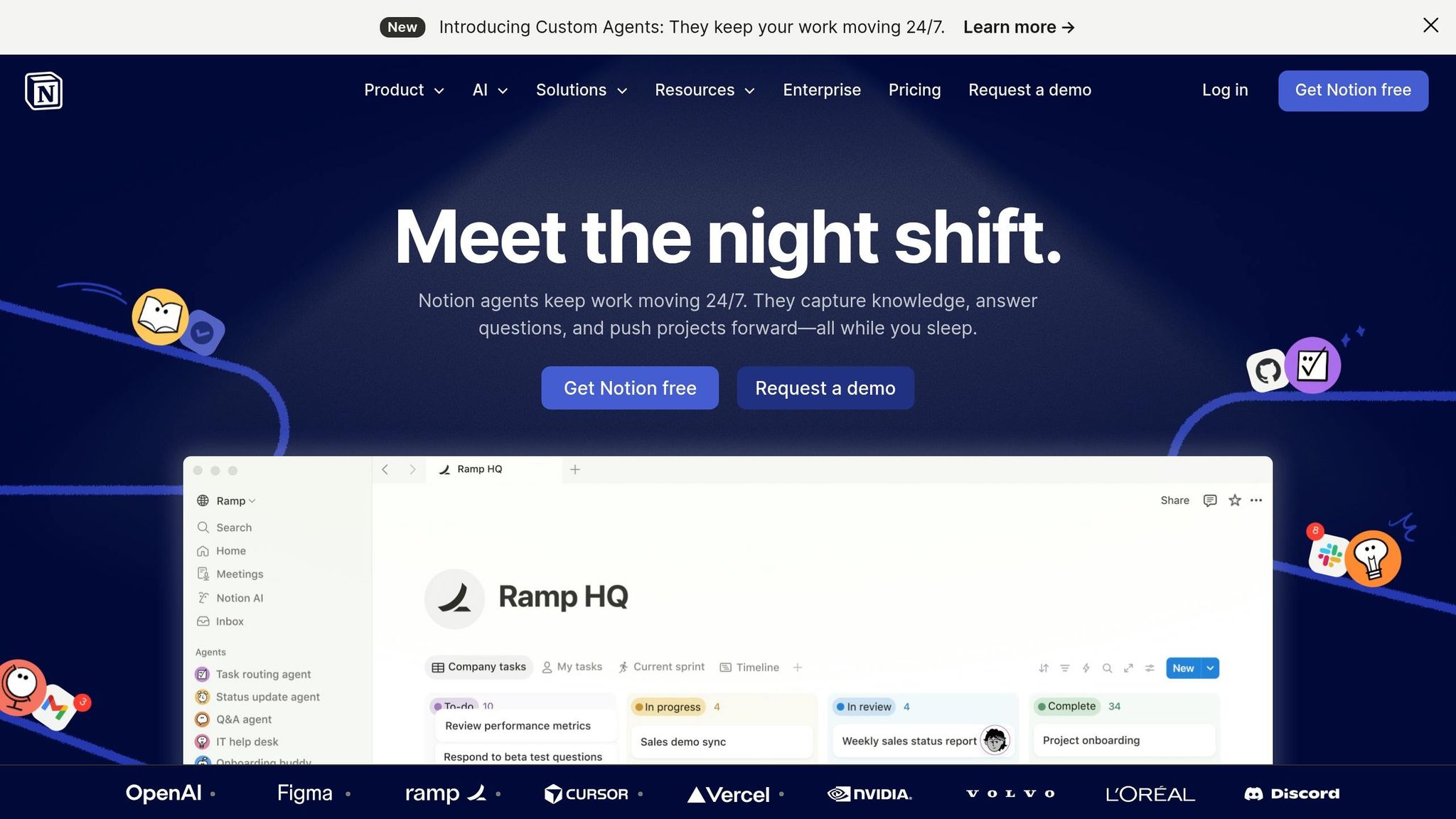
Notion AI has transformed from a simple writing assistant into a fully autonomous agent capable of managing complex workflows around the clock. Since its launch in February 2026, Notion Custom Agents have operated continuously, responding to schedules, database events, or even Slack messages - eliminating the need for manual prompts. The platform offers access to premium models like GPT-5, Claude Opus 4.1, and o3 under one subscription, allowing users to switch between models based on their specific needs.
Task Automation Capabilities
Notion Agents excel at handling multi-step tasks autonomously for up to 20 minutes. These tasks include everything from researching competitors and creating comparison tables to drafting detailed strategy documents. The AI seamlessly interacts with databases - adding rows, updating tags, reformatting properties, and assigning due dates. It can also transform unstructured information, like meeting notes, into structured outputs such as project proposals, Kanban boards, or task lists [123, 127]. Teams using these agents have reported impressive results: a 40% reduction in administrative tasks, an 80% improvement in report efficiency, and savings of up to six work hours per week per agent [123, 127]. These efficiencies translate into tangible time and cost savings for businesses.
Real-World Applications
The practical impact of Notion AI is evident in its rapid adoption. Within weeks of its public beta launch in early 2026, users created over 21,000 Custom Agents, while Notion itself employs 2,800 agents - more than its total workforce. For instance, Remote's IT operations team leveraged a single triage agent to save 20 hours per week, achieving over 95% accuracy and resolving 25% of tickets autonomously. Similarly, Braintrust's VP of Marketing, Morgane Palomares, implemented two Custom Agents for tasks like competitive intelligence and customer reference tracking, saving 20 minutes of manual work each day.
"Our agents answer dozens of nuanced product and enablement questions every day with a high success rate. Teams that used to monitor those channels now just audit responses and feed improvements back into the Custom Agent." – Ben Levick, Head of Operations and Internal AI, Ramp
Integration with Other Tools
Notion AI is designed to integrate seamlessly with major platforms like Google Drive, Gmail, Outlook, Slack, Jira, GitHub, Asana, and Microsoft Teams, enabling users to access external data directly within Notion. It also supports the Model Context Protocol (MCP), allowing secure connections to systems such as HubSpot, Stripe, Intercom, and Sentry, as well as custom internal MCP servers. Unlike traditional AI tools that rely on manual inputs, Notion’s Custom Agents are event-driven, executing workflows in response to triggers like new comments or Slack messages. For example, Ramp uses over 300 internal agents to handle product and roadmap inquiries efficiently. By integrating with essential business tools, Notion AI enhances productivity through streamlined, automated workflows.
Cost-Effectiveness
Notion AI’s pricing model highlights its value in reducing operational expenses. As of May 2025, unlimited AI access is included in the Business and Enterprise tiers, priced at $20 per user per month (billed annually), replacing the previous $8 AI add-on [132, 133]. Custom Agents are available at $10 per 1,000 Notion Credits, with credits shared across the workspace and resetting monthly, starting May 4, 2026. For a 50-person team, the Notion Business plan (approximately $12,000 annually) can deliver estimated cost savings of 46–54% compared to using separate solutions. Enterprise customers committing to multi-year agreements can unlock further discounts of 20–30%.
Conclusion
By 2026, AI agents have redefined how work gets done. These tools have evolved far beyond basic assistance - they now observe, make decisions, and execute complex workflows independently. The leap from simple chatbots to fully autonomous systems means entire tasks can be delegated, whether it’s scheduling meetings 24/7, resolving up to 80% of support tickets autonomously, or driving 12x efficiency improvements in engineering workflows.
The 10 tools discussed in this guide are designed to take over time-consuming, non-critical tasks. Some focus on specific needs like scheduling or lead research, while others manage multi-agent workflows across your existing tech stack. The key to success is identifying your biggest bottleneck. For instance, if manual data entry eats up 10+ hours of your week, start there. If slow customer support is dragging down satisfaction scores, deploy an agent to handle ticket triage.
This shift reflects a broader realization in the industry:
"AI agents don't replace jobs. They replace tasks." - Prateek Vishwakarma
The most successful entrepreneurs and companies aren’t rushing to automate everything at once. Instead, they start with clearly defined tasks and rigorously measure their results - tracking time saved and calculating ROI. As mentioned earlier, organizations using these tools report a 22% boost in employee productivity compared to those who haven’t adopted them.
With the market hitting $7.63 billion in 2025 and growing nearly 50% annually, these tools are becoming both more advanced and more affordable. Many businesses see a return on their investment within 60 to 90 days. No matter the scale of the tool, the focus should remain on prioritizing the right tasks for automation to see quick and meaningful results.
FAQs
What makes an AI agent different from a chatbot?
AI agents and chatbots might seem similar on the surface, but they serve very different purposes due to their autonomy, goal-oriented design, and complexity. Chatbots are primarily reactive tools built to handle straightforward, predefined tasks, such as answering FAQs or providing basic customer support. They operate within clear boundaries and depend on pre-programmed scripts to respond.
On the other hand, AI agents are far more advanced. These systems work autonomously, meaning they can reason, plan, and adapt without continuous human guidance. They’re designed to tackle multi-step goals, often across multiple systems, making them ideal for managing intricate workflows. While chatbots shine in simple, conversational scenarios, AI agents are the go-to for handling more complex, dynamic processes.
How do I choose the right AI agent for my workflow?
To find the best AI agent for your needs, consider these important factors:
- Goal-oriented capabilities: Look for agents that can tackle complex tasks on their own without constant supervision.
- Integration: Ensure the agent works smoothly with tools you already use, like Slack or Salesforce.
- Reliability: Choose one with a track record of consistent performance and the flexibility to adapt to your requirements.
- Use case fit: Pick an agent designed specifically for your needs, whether it’s marketing, automation, or another area.
- Cost: Evaluate both the pricing and how easily the agent can be deployed.
Select an AI agent that aligns with your workflow and boosts productivity without adding unnecessary complications.
How can I keep AI agents secure with my company data?
To keep AI agents safe when handling company data, focus on key strategies like identity management, access control, and data privacy. Safeguard every layer of the agent’s architecture by implementing robust security practices. Tools such as DSPM (Data Security Posture Management) or CNAPP (Cloud-Native Application Protection Platforms) can also help maintain compliance with regulations.
Additionally, regular monitoring, maintaining audit trails, and enforcing strict governance are essential steps to quickly detect and respond to potential threats. By combining these efforts, companies can protect sensitive data effectively, even in today’s challenging security environment.