Digital Transformation
Best No-Code AI App Builders 2026: Build Apps Without Coding
Compare six top no-code AI app builders — features, pricing, and best use cases — to choose the right platform for MVPs, mobile apps, or enterprise projects.

Best No-Code AI App Builders 2026: Build Apps Without Coding
Building AI-powered apps no longer requires coding expertise. No-code platforms now let you create functional apps quickly using visual tools and plain English instructions. These tools cut development costs by up to 80% and speed up timelines by 50%-90%. By 2026, 75% of new apps are expected to rely on no-code or low-code technologies. Below, we break down six leading platforms:
- Replit: AI-driven, full-stack app builder with exportable code and team collaboration tools.
- Bubble: Visual logic editor for creating both frontend and backend workflows, ideal for SaaS and marketplaces.
- Softr: Template-based builder for apps connected to Airtable, Google Sheets, and more.
- Adalo: Mobile-first platform for native iOS and Android apps with device hardware integration.
- Glide: Turns spreadsheets into web apps with real-time syncing and AI-powered workflows.
- Momen: Full-stack platform with advanced AI workflows, suitable for complex applications.
Each platform offers a unique set of features, pricing, and use cases. Whether you’re building an MVP, internal tool, or enterprise-grade app, there’s a solution for your needs.
Quick Comparison
| Platform | Best For | Pricing Starts At | Key Features | Supported Platforms |
|---|---|---|---|---|
| Replit | Startups, SaaS, internal tools | Free | Exportable code, AI Agent, team editing | Web, iOS, Android |
| Bubble | Marketplaces, SaaS, internal tools | $59/month | Visual logic editor, AI workflows | Web, iOS, Android |
| Softr | Dashboards, portals, CRMs | Free | Pre-built blocks, data syncing | Web |
| Adalo | Native mobile apps | Free | Native iOS/Android, device integration | Web, iOS, Android |
| Glide | Spreadsheets to apps | Free | Real-time syncing, AI tools | Web (PWAs) |
| Momen | Full-stack, scalable apps | Free | AI workflows, advanced backend options | Web (PWAs) |
These platforms simplify app development, making it accessible to non-developers while saving time and money.
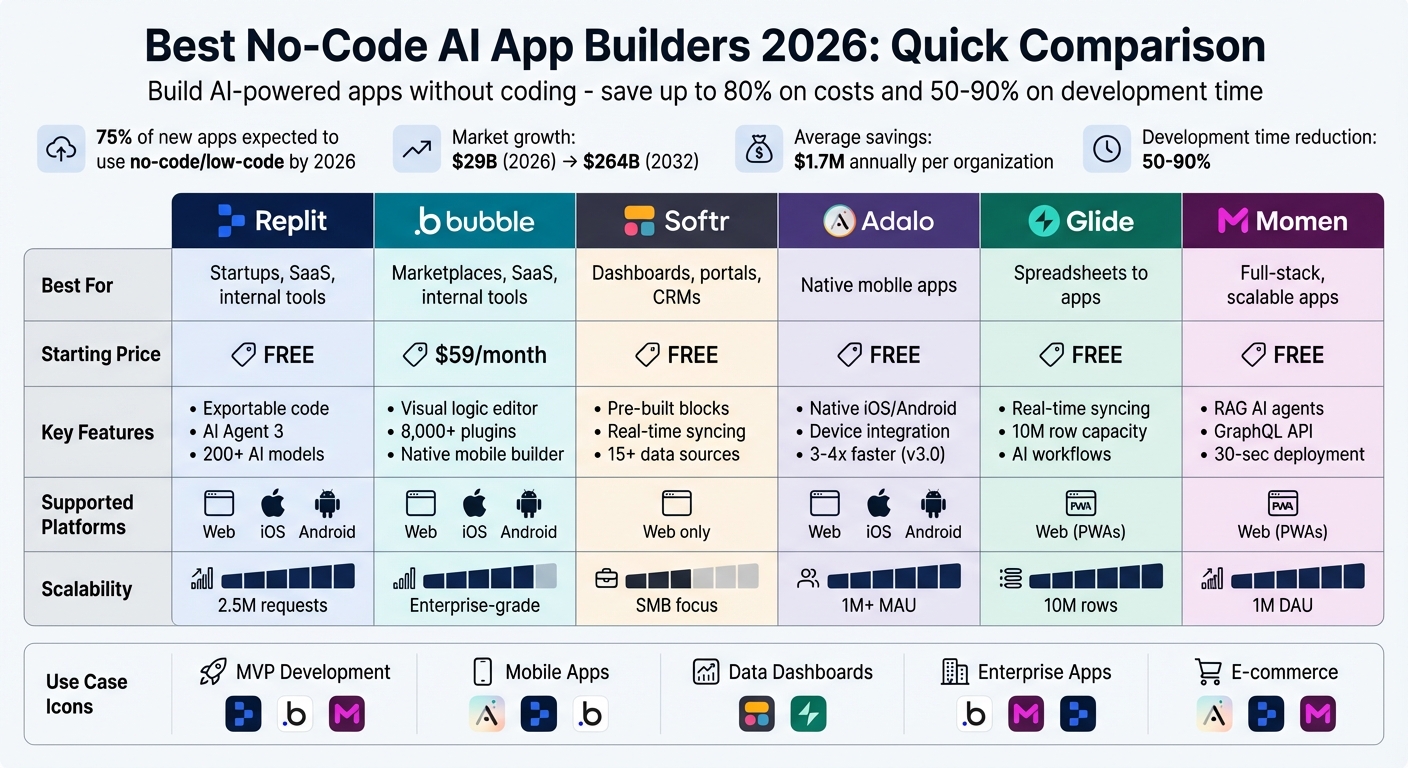
No-Code AI App Builders 2026: Feature and Pricing Comparison
The 6 BEST vibe coding tools right now (we tested them all)
1. Replit AI-Powered Builder
Replit takes your plain English descriptions and turns them into fully functional apps. With its autonomous AI Agent 3, the platform handles everything from building and testing to deploying your application. It can dedicate up to 200 minutes per task, tackling jobs like database schema design and frontend styling.
Here’s a closer look at what makes Replit a standout tool for no-code app development.
Core Features
Replit provides seamless access to over 200 AI models through integrations with OpenAI, Anthropic, Google Gemini, and OpenRouter. The best part? You don’t need external API keys or separate billing accounts. Unlike platforms that rely on rigid templates, Replit generates exportable code in languages like React, Python, and Node.js, giving you full ownership of your projects. You can download your work as ZIP files or push it directly to GitHub for complete control over your source code.
The platform’s infrastructure is equally impressive. It includes built-in PostgreSQL databases, user authentication, file storage, and autoscale hosting capable of managing up to 2.5 million requests. You can even import designs straight from Figma, turning visual mockups into functional code with ease. For teams, Replit offers real-time collaborative editing, allowing multiple users to work on the same project simultaneously.
Best Use Cases
Replit shines in scenarios where speed and efficiency are key. For example, in 2025, Rokt created 135 internal apps in just 24 hours using Replit Agent. Similarly, BatchData developed three enterprise-grade tools in a matter of days, cutting costs by an estimated $62,000 annually. These examples show how Replit is ideal for startups building MVPs, B2B SaaS platforms, AI chatbots, e-commerce sites, and internal business software.
Pricing Tiers
Replit offers flexible pricing to suit different needs:
- Starter Tier: Free, designed for learning and prototyping. Includes limited AI features and one published app.
- Core Plan: $20/month (billed annually), with $25 in monthly credits, unlimited private apps, and access to advanced AI models.
- Teams Plan: $35 per user/month (billed annually), offering $40 in monthly credits per user, centralized billing, and private deployments.
Beyond these tiers, Replit uses effort-based pricing, meaning you only pay for the compute resources and AI tokens you use. Enterprise customers can opt for custom pricing, which includes features like SSO/SAML, SOC 2 Type 2 compliance, and dedicated support.
Supported Platforms
Replit enables you to build responsive web and native mobile apps for both iOS and Android. It’s also the only platform that lets you create and manage full-stack applications directly from a mobile device, giving you the freedom to work from anywhere.
2. Bubble Visual Logic Platform
Bubble brings together design, database management, and workflow integration into a single platform, enabling you to handle both frontend and backend development seamlessly. Its AI Agent can generate an entire app from just one prompt, including the interface, database, and workflows. If the AI-generated draft isn't perfect, you can refine it further with a user-friendly drag-and-drop editor.
With its strong AI capabilities, Bubble has cultivated a thriving community. Over 5 million users have built more than 6 million apps on the platform. It also offers a marketplace with 8,000+ plugins and built-in infrastructure that covers hosting, SSL certificates, and enterprise-level security features like SOC 2 compliance and GDPR readiness.
Core Features
Bubble's visual logic editor allows you to create intricate workflows without writing a single line of code. The AI speeds up prototyping, while manual adjustments help avoid repetitive "prompt loops." The platform includes a built-in database, so you won't need external solutions like Supabase or Firebase.
A native mobile app builder (currently in beta) enables you to design and publish apps directly to the Apple App Store and Google Play. Additionally, you can integrate custom AI models, such as GPT-4 or Claude, using the platform's API Connector.
These features make Bubble a comprehensive and efficient tool for app development.
Best Use Cases
Bubble is particularly effective for building marketplaces, AI-powered SaaS platforms, internal tools, and community-driven platforms. For example, Renee Jackson, founder of Dyspute.ai, used Bubble to create an AI-led mediation function in just eight weeks. She shared:
"The biggest surprise is that I was able to build this AI-led mediation function in eight weeks. In my head, that was going to be a year-long process, at least."
Its enterprise-level security also makes Bubble well-suited for industries with strict regulations, such as healthcare and legal tech.
Pricing Tiers
Bubble’s pricing is based on a usage model called Workload Units (WU), which measure server resources. You can build and test apps indefinitely on the free plan, upgrading only when you're ready to launch.
| Plan | Price (Annual) | Workload Units | Best For |
|---|---|---|---|
| Free | $0/month | 50,000 WU/month | Learning and prototyping |
| Starter | $59/month | 175,000 WU/month | Individual launches |
| Growth | $209/month | 250,000 WU/month | Team collaboration |
| Team | $549/month | 500,000 WU/month | Scaling businesses |
| Enterprise | Custom pricing | Custom WU | Maximum scale and security |
If you exceed your allocated workload, additional units are priced at approximately $0.30 per 1,000 WU.
Supported Platforms
Bubble supports the development of responsive web apps and native mobile apps for both iOS and Android. Web apps run directly in browsers, while native apps - built with React Native - deliver enhanced performance and full access to device features.
3. Softr Template-Driven Tools
Softr offers a streamlined way to build apps by leveraging your existing data. Instead of starting from scratch, you connect sources like Airtable, Google Sheets, Notion, or HubSpot, and the platform creates a professional interface in just minutes. With over 1 million teams worldwide using Softr, it's a popular choice for businesses needing tools like client portals, internal dashboards, or CRMs - minus the complexity of traditional development.
The AI App Generator simplifies the process even further. By entering a short prompt, you get a ready-to-go app framework, complete with login pages, user groups, and sample data. From there, you can customize your app using over 100 pre-built blocks - forms, charts, lists, and more - that snap together seamlessly to create a responsive design.
Ashley Kalinauskas, CEO of Torigen Pharmaceuticals, highlights its accessibility:
"We're not coders or developers, but Softr is so easy to use and learn - it lets us run with our ideas."
Another standout feature is Ask AI, which allows you to query live data in plain English. For instance, typing "How many deals closed last month?" instantly retrieves the answer, eliminating the need to sift through spreadsheets. The platform also includes granular user permissions, giving you full control over what different groups can view or edit.
Core Features
Softr's block-based builder eliminates the need for pixel-perfect design skills. You simply arrange pre-made components to create responsive, user-friendly interfaces. It supports real-time two-way syncing with over 15 data sources, so updates to your Google Sheets or Airtable data are instantly reflected in your app.
For teams managing internal data, Softr Databases provides a built-in relational database, removing the need for external tools. Apps can also be converted into Progressive Web Apps (PWAs) with just a few clicks, allowing users to install them directly from their browser - no app store required. Plus, Softr ensures enterprise-grade security with SOC 2 (Type II) compliance and Single Sign-On (SSO) support.
Best Use Cases
Softr works well for building secure portals, internal tools, and dashboards, especially for small to mid-sized businesses in industries like professional services, construction, manufacturing, and recruitment. Natalie Neumann, COO at Designity, shared how Softr transformed their workflow:
"We thought we'd need developers, a product manager, and UX designers before launching a new project management system. With Softr, we built it ourselves in weeks."
While it may not be the best fit for developing complex SaaS products with highly customized workflows, Softr is ideal for creating polished, functional interfaces for your existing data in record time.
Pricing Tiers
Softr's pricing depends on the number of logged-in users and data record limits. You can experiment on the free plan indefinitely before upgrading for production use.
| Plan | Price (Annual) | Users | Apps | Key Features |
|---|---|---|---|---|
| Free | $0/month | 10 | 1 | 5,000 records, 500 AI credits |
| Starter | $49/month | 20 | 3 | Custom domain, 50,000 records |
| Professional | $139/month | 100 | Unlimited | PWA, Charts, No branding, Ask AI |
| Business | $269/month | 500 | Unlimited | Advanced data sources, SSO, 1M records |
| Enterprise | Custom pricing | Custom | Unlimited | Dedicated support, SAML/OpenID |
Non-profits and educational institutions can take advantage of a 30% discount.
Supported Platforms
Softr creates responsive web apps that work across all modern browsers and devices.
4. Adalo Mobile-First Apps
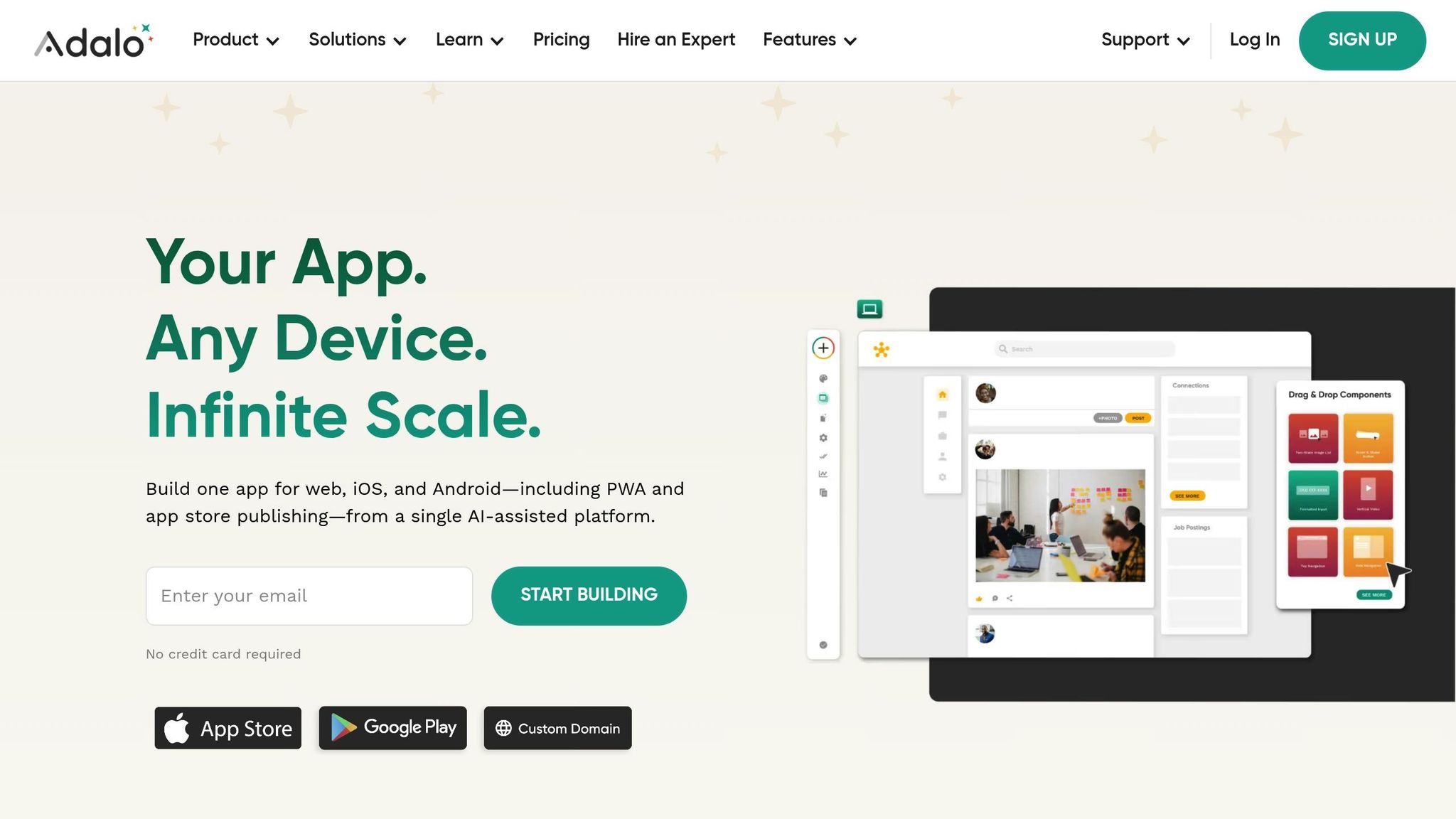
Adalo takes your app idea and compiles it into native iOS and Android code, giving it direct access to device hardware like GPS, cameras, and push notifications. With over 3 million apps powered and more than 20 million daily data requests processed, the platform is built for scale. The launch of Adalo 3.0 in late 2026 brought major performance upgrades - apps now run 3–4 times faster and can handle over 1 million monthly active users. Plus, with a 99%+ uptime, you can count on production-level reliability.
Adalo’s smart tools, like Magic Start and Magic Add, simplify the development process. Magic Start builds the app's foundation - database, screens, and user flows - based on a simple text description. Magic Add takes it further by letting you describe new features in plain English, which are then added automatically. The X-Ray feature monitors performance in real time, identifying bottlenecks before they affect users.
Alexandrina Mabonga, creator of the Sunscreen app, shared her thoughts:
"Adalo has helped me to speed up this project at such a low cost that it's crazy. I am able to fulfill my dreams in half the time & that is the largest cost-benefit."
Adalo also includes a built-in relational database with custom formulas and unlimited records on paid plans. If you’re working with Google Sheets data, SheetBridge can transform it into a functional database without the hassle. For even more flexibility, you can connect to over 5,000 services through Zapier, including OpenAI and ChatGPT for advanced AI capabilities.
Core Features
Adalo’s drag-and-drop builder offers a user-friendly interface that feels familiar and intuitive. The canvas supports up to 400 screens, giving you a complete project overview while ensuring one version works seamlessly across web, iOS, and Android.
The Component Marketplace provides access to over 50 premium add-ons for specialized features like Stripe payments, Google Maps integration, and in-app purchases via IAPHUB. Paid plans include unlimited database records without usage-based charges, so you can scale without worrying about unexpected costs.
Best Use Cases
Adalo shines when you need native device features and a direct app store presence. It’s ideal for apps like booking systems for salons or fitness classes, e-commerce platforms for restaurants and retail, community apps with messaging and social feeds, and business tools like field service management or internal CRMs. Development timelines are drastically reduced - what might take 4–6 months with custom coding can often be completed in just 2–4 weeks.
Pricing
Adalo uses a free build, paid publishing model with flat-rate pricing to eliminate surprise fees.
| Plan | Price (Annual) | Published Apps | Editors | Key Features |
|---|---|---|---|---|
| Free | $0/month | 0 | Unlimited | 200 records, unlimited test apps |
| Starter | $45/month | 1 | 1 | Custom domain, App Store/Google Play |
| Professional | $65/month | 2 | 5 | Geolocation, 25GB storage, unlimited records |
| Team | $200/month | 5 | 10 | Xano integration, priority support |
| Business | $250/month | 10 | Unlimited | 500GB storage, advanced features |
If you need additional published apps, they cost $25/month each, and extra editor seats are available for $15/month.
Supported Platforms
Adalo supports publishing to the Apple App Store, Google Play Store, and responsive web apps. You can also create Progressive Web Apps (PWAs), which users can install directly from their browser.
sbb-itb-212c9ea
5. Glide Spreadsheet Automation
Glide transforms your existing data from tools like Google Sheets, Excel, or Airtable into fully functional web apps. With over 100,000 companies on board - including big names like HP, Coca-Cola, and Volkswagen - Glide has proven its impact. For example, one company saw a 15x boost in field technician efficiency, while another reported a 750% increase in revenue after building custom apps with Glide.
Glide Agent: AI-Powered App Creation
The Glide Agent simplifies app creation with AI. Just describe what you need in plain text, and it takes care of the rest - structuring your data and designing the layout. The AI also selects the best models and performs automatic upgrades, so you don’t have to worry about technical details like API connections or prompt engineering.
AI Features and Visual Workflows
Glide offers ten AI-driven tools, including Audio to Text, Image to Text (OCR), Document to Text, and structured transformations like Text to Boolean or JSON. These tools clean up unstructured data, turning it into well-organized, queryable entries. Plus, the Visual Workflows builder lets you create advanced logic, schedules, and webhooks - no coding required.
Core Features
Glide’s drag-and-drop interface is designed to work seamlessly across all devices. Unlike native app builders that require separate versions for iOS and Android, Glide creates Progressive Web Apps (PWAs) that sync instantly through a browser. For large-scale needs, Glide Big Tables can handle up to 10 million rows, making it ideal for enterprise use.
The platform scores high in user satisfaction, earning a 4.7/5 rating on G2 from over 770 reviews. Users often highlight its speed and polished design. As one reviewer, Adam S., put it:
"Glide is so satisfying to use that you'll want to implement it in everything you do."
Best Use Cases
Glide shines in scenarios requiring real-time syncing, such as:
- Field service management
- Inventory tracking
- Employee directories
- Custom CRMs
It’s particularly valuable for industries where mobile and desktop teams need instant access to shared data.
Pricing Tiers
Glide offers a flat-rate pricing model based on user count and monthly "updates" (data-changing actions). Additional business users cost $5 each, and extra updates are $0.02 per action.
| Plan | Price (Annual) | Users | Monthly Updates | Data Sources |
|---|---|---|---|---|
| Free | $0/month | 10 Personal | 0* | Glide Tables only |
| Explorer | $19/month | 100 Personal | 250 | Glide Tables, Big Tables |
| Maker | $49/month | Unlimited Personal | 500 | Google Sheets, Glide Tables |
| Business | $199/month | 30 Business | 5,000 | Airtable, Excel, Google Sheets |
| Enterprise | Custom | Custom | Custom | SQL, BigQuery, Salesforce |
*Updates to Glide Tables are excluded from the Free plan’s limit.
Supported Platforms
Glide ensures a consistent experience across all devices by creating Progressive Web Apps. These apps work directly in browsers and can be installed for an app-like feel - no app store approval required. While you won’t find Glide apps in the Apple App Store or Google Play Store, this approach eliminates the hassle of traditional publishing.
6. Momen Full-Stack AI Platform
Momen offers a comprehensive, full-stack solution for building no-code AI applications, integrating everything from frontend design to backend logic, database management, and hosting. It powers over 300,000 founders and supports more than 10 million end users on AWS, handling up to 1 million daily active users.
Core Features
Momen's Agentic AI Workflows enable the creation of advanced AI agents using RAG (Retrieval-Augmented Generation), tool invocation, and AI chaining. The RAG engine enhances accuracy by pulling data from integrated databases, external APIs, and uploaded files like PDFs, images, and videos. These agents can execute backend workflows, call APIs, or even trigger other agents to perform complex tasks. Each user gets 100,000 free AI points monthly for use with Momen's hosted models.
While Momen is primarily no-code, it also offers low-code options, including JavaScript logic, React components, searchable logs, and a self-documenting GraphQL API. Its Mirror feature provides real-time feedback on edits, eliminating the need for deployment or page refreshes. Deployment itself is seamless, with both frontend and backend live in under 30 seconds with a single click.
These features make Momen a strong contender for handling complex, real-world applications.
Best Use Cases
Momen shines in areas like e-commerce, SaaS, and AI-powered community platforms. For instance:
- Minicollector: Anthony Xu created a card collection app that manages over 4 million SKUs with automated inventory and shipping, generating $400,000+ annually.
- Futurise: Leon Petrou launched an AI-driven community platform with a RAG-based search assistant in just two months, part-time. The platform achieved over 1,000 active members and monetized within its first week.
Pete Gosling of Gosling Media shared his experience:
"Momen changes the game: everything's integrated, and the built-in AI Agents sealed the deal. In just two weeks, we launched a full client site and expanded from a design agency into web development - without writing code."
Pricing Tiers
Momen uses a project-based pricing structure, offering predictable costs as your application grows. Students and educators can take advantage of a 50% discount.
| Plan | Price (Annual) | AI Agents | Database Storage | AI Points/Month | Key Features |
|---|---|---|---|---|---|
| Free | $0/project | 1 | 20 MB | 100,000 | Full visual builder, Momen branding |
| Basic | $33/project | Unlimited | 200 MB | 1,000,000 | Custom domain, white labeling, SEO tools |
| Pro | $85/project | Unlimited | 1 GB | 5,000,000 | Stripe payments, SSO, 10 collaborators |
| Enterprise | Custom | Unlimited | Custom | Custom | Dedicated support, custom resources |
Add-ons include 1 GB of database storage for $100/year, 6,000,000 AI points for $10, and 100,000 automated workflow runs for $10.
Supported Platforms
Momen specializes in responsive web applications and Progressive Web Apps (PWAs). A single "Pro" project backend can support multiple frontend apps with tailored interfaces. The platform also offers granular access controls, combining RBAC (Role-Based Access Control) and ABAC (Attribute-Based Access Control) at the row and column level.
Advantages and Drawbacks
Choosing the right platform comes down to balancing its strengths and limitations with your technical skills, budget, and project goals. Tools like Momen, which integrate AI-generated code with production infrastructure (like databases and hosting), are perfect for non-technical founders aiming to create a functional app rather than just a prototype. With that foundation, it's essential to dive deeper into how pricing, scalability, AI features, and distribution options set these platforms apart.
Pricing plays a major role in long-term affordability. Usage-based models can lead to unpredictable costs, while flat-rate plans, such as Adalo's $45/month Starter plan or Momen's $33/month Basic tier, provide consistent expenses. This predictability is especially appealing for small businesses replacing costly per-user SaaS tools.
When it comes to scalability, the platforms vary widely. Bubble and Momen are built to support high-traffic enterprise applications, while Adalo can handle up to 1 million monthly active users. On the other hand, Glide and Softr are better suited for creating internal tools or client portals, making them ideal for projects with a moderate user base. Whether you're building a minimum viable product or a full-scale SaaS platform, scalability should align with your long-term vision. But don’t overlook the importance of AI features when making your decision.
AI functionality is another area where platforms differ significantly. Some focus on basic text generation, while others support advanced automation workflows. For example, Momen enables complex automation, and Softr's AI assistant simplifies block-based app building. Replit Agent even offers autonomous debugging, though it occasionally makes unexpected changes, like altering user interfaces without consent. For non-technical users, platforms that explain processes in plain English rather than relying on technical jargon typically provide a smoother experience.
Finally, distribution capabilities can be a deciding factor. If publishing to the App Store is a priority, native builders like Adalo are a better fit compared to PWA-only platforms. Code ownership is another critical consideration - platforms that allow you to export code can help avoid vendor lock-in. Many no-code tools, however, keep you tied to their ecosystem, making it essential to choose wisely to prevent migration headaches down the line.
Conclusion
Choosing the right app builder depends on your goals. For native mobile apps, Adalo is a solid option. If you're looking to create instant dashboards from existing data, Softr and Glide are great picks. For full-stack, complex applications, Bubble and Replit stand out as top choices.
The future of low-code and no-code platforms is bright. By 2026, 75% of new apps will rely on these technologies, enabling organizations to save an average of $1.7 million annually while slashing development time by up to 90%. The market itself is expected to grow significantly, from around $29 billion in 2026 to a staggering $264 billion by 2032. This makes now the perfect moment to explore and adopt these tools.
When selecting a platform, weigh your options carefully. Budget matters - some platforms offer predictable flat rates, while others use usage-based pricing models, which may suit different project scales. Additionally, think about code ownership. Do you need full control to avoid vendor lock-in, or does a managed ecosystem fit your needs better? The answer often depends on your specific project: whether you're building an MVP to test the waters, internal tools to optimize operations, or a customer-facing product that needs to scale efficiently.
FAQs
How do no-code platforms ensure app security and protect data privacy?
No-code platforms put a strong emphasis on security and data privacy, incorporating features like data encryption, user authentication, and access controls. These elements work together to protect sensitive information while keeping app development straightforward and accessible.
Many of these platforms also meet key industry standards and compliance requirements, which is especially critical in regulated fields like healthcare and finance. By offering managed infrastructure for deployment and scaling, they reduce the technical workload for users while maintaining high levels of security.
Thanks to these built-in protections and compliance-oriented designs, no-code platforms make it possible to develop secure, privacy-focused applications without needing deep technical knowledge.
What challenges can arise when using no-code platforms for building complex apps?
No-code platforms are a fantastic option for building apps quickly without needing programming skills. They shine when it comes to straightforward projects or prototypes. However, they can hit roadblocks when you're dealing with complex or large-scale applications.
One of the main challenges is their lack of flexibility. If you need highly specific or advanced features, no-code tools may not offer the customization or functionality required. As apps grow more intricate, you might also encounter performance hiccups, like slower load times or inefficient data processing.
Another hurdle is scalability. Connecting these platforms to custom or legacy systems or managing intricate integrations can be tricky. For applications that require a high level of specialization or are critical to operations, there can be risks tied to security, compliance, and long-term upkeep.
While no-code platforms are great for many scenarios, their limitations become clear when you're aiming to meet more demanding app requirements.
Can I move my app to another platform or export it if I use a no-code builder?
Yes, plenty of no-code app builders let you export your app or move it to a different platform. However, the options you’ll have depend on the specific tool you’re using. Some tools include built-in export functions or offer integrations to make migration easier, while others might have stricter limitations. It’s a good idea to check the platform’s documentation or reach out to their support team to understand what’s possible before diving into your project.